
US Ticket Guide
Contents
1. Ticket Essentials
1.1 Session Box
What is Session Box?
Session Box is a browser extension, which enables you to use any website with multiple user accounts, without the need of incognito windows, secondary browsers or new browser profiles. Session Box can save these instances, so they are always accessible.
How can we take advantage of this?
Session Box can be used to great effect when trying to handle the new Ticketmaster smart queue system. Simply create a new instance using Session Box create an account and then enter this account into the queue. As many of you may figure out, the new "smart queue" is able to detect if you open multiple tabs, whereas it cannot detect Session Box.
Setting it up
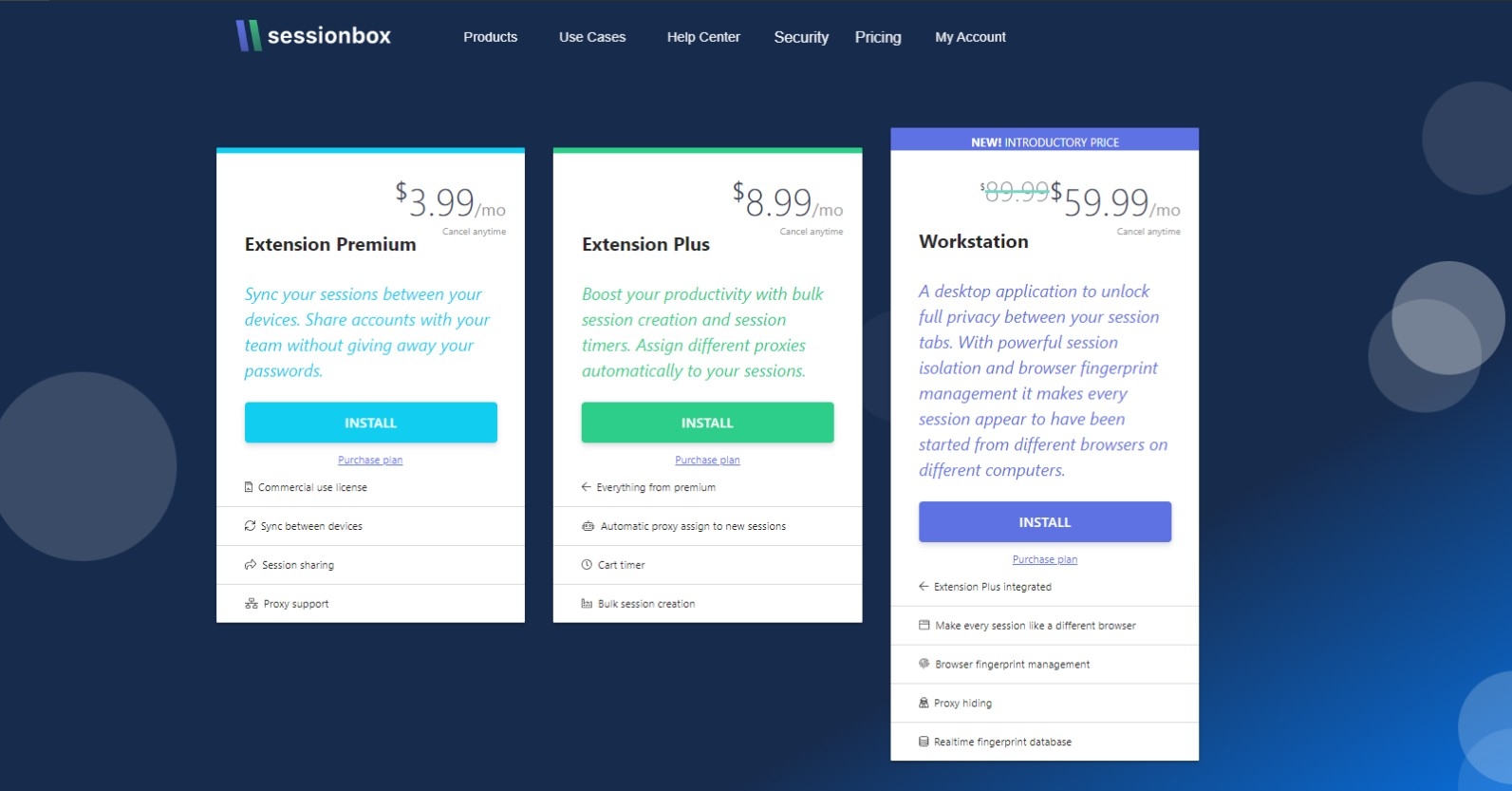
1) Firstly, navigate to Session Box website and select the extension plus package. This will allow you to open an unlimited number of sessions simultaneously. The free plan will only allow you to open 5 sessions simultaneously.
2) You will be navigated to the chrome store to download the Session Box extension.
3) Once downloaded click the extension that should be in the top right of your google chrome browser and sign into your account.
Adding Proxies
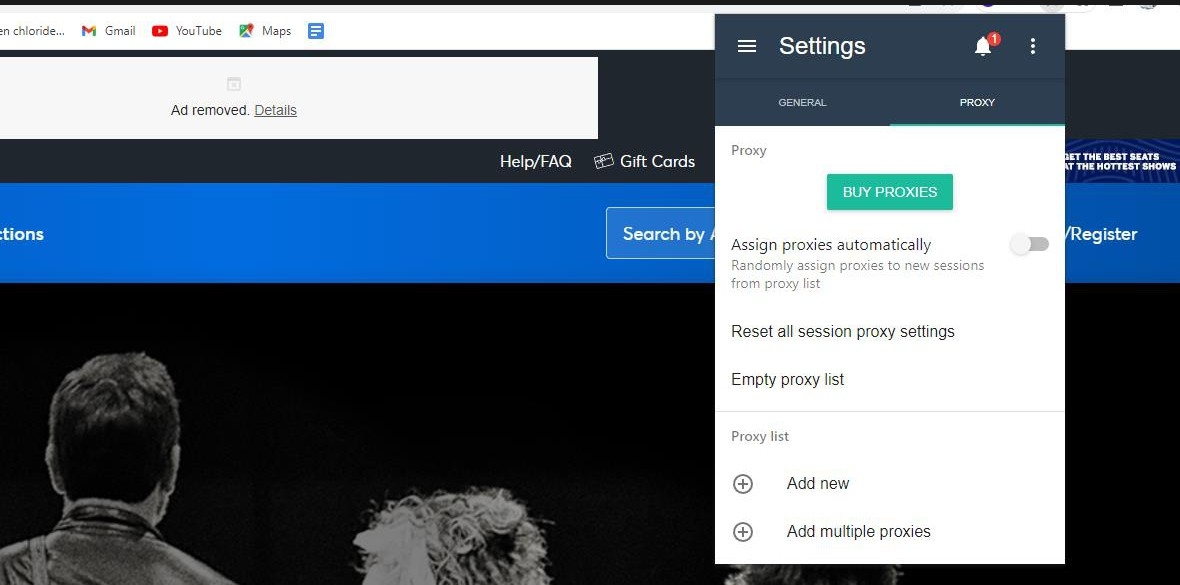
1) Firstly, click the Session Box extension and then click the options button in the top left corner.
2) Next select settings and then proxies.
3) Then scroll down to proxy list and select add new. Your proxies will usually be in a HTTP format and thus you will need the name, the address, the port and occasionally the username and password. The name is up to you but usually proxies are formatted in the following way address:port:user:password. However, this may differ so contact you proxy provider.
4) Discounted proxy plans can be found in #partnerships
Using Session Box on Ticketmaster
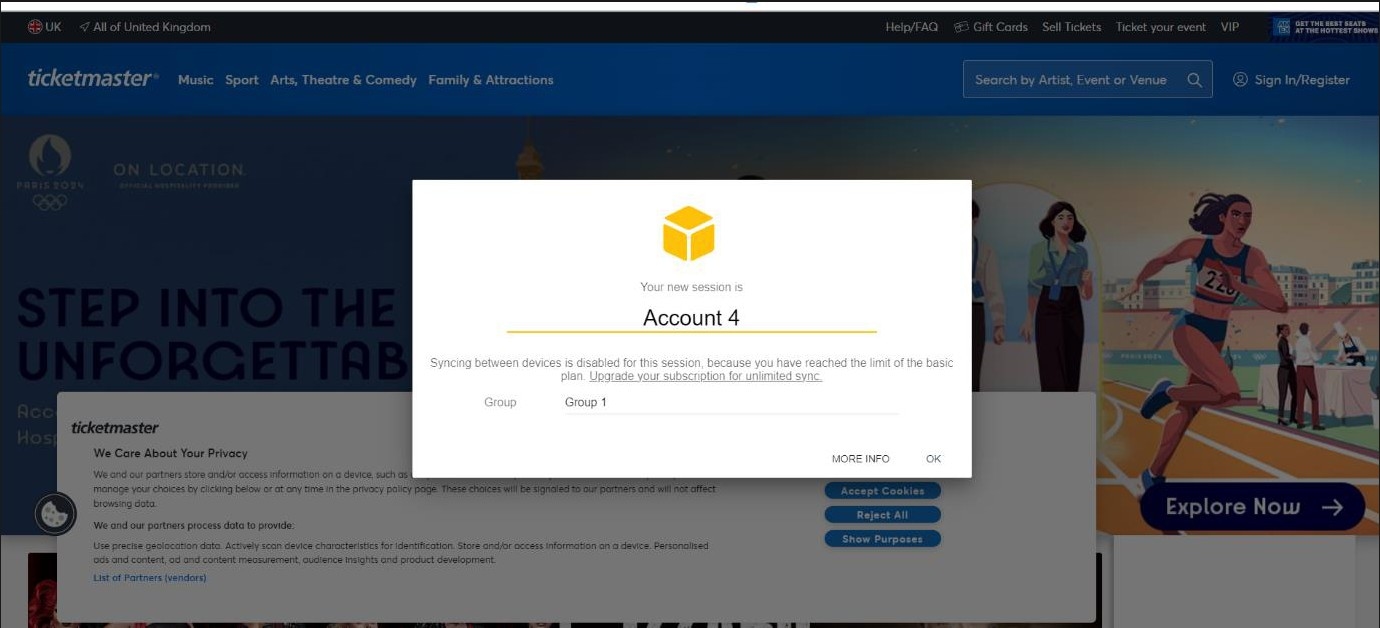
1) Firstly, click the Session Box extension and then click the + symbol that is enclosed in a circle and furthest on the right. This will create a session.
2) Next navigate to Ticketmaster and create a new account or sign into an existing one. If you decide to create a new account, ensure it has a unique phone number.
3) Once you are signed into your account that instance is now ready to be used on the new queue system. Just ensure you have your phones handy to enter the OTPs. If you are looking for free sim cards they can be found here
4) Then repeat this process for all your accounts.
5) On release day, you can open all your previous instances that will be signed into Ticketmaster. You will not have to enter OTP when you enter the smart queue as you are already logged in.
1.2 Catchall and Gmail Forwarding
What is a catchall?
A catchall account is an email address that collects all the mail sent to your domain name not sent to the other email addresses known to the server. Any emails sent to recipients at your domain, for example, will be "caught" by the catchall account.
Example: [email protected]
How can we use this in Ticket Reselling?
It is important to make unique accounts for releases to ensure that you can purchase tickets beyond the limits and to increase chances of getting past the queues quickly on sites such as Ticketmaster or AXS. Each account should be setup with unique details this means unique emails, names, phone numbers and addresses.
How to create a Catchall
1. Create an account at https://www.namecheap.com/
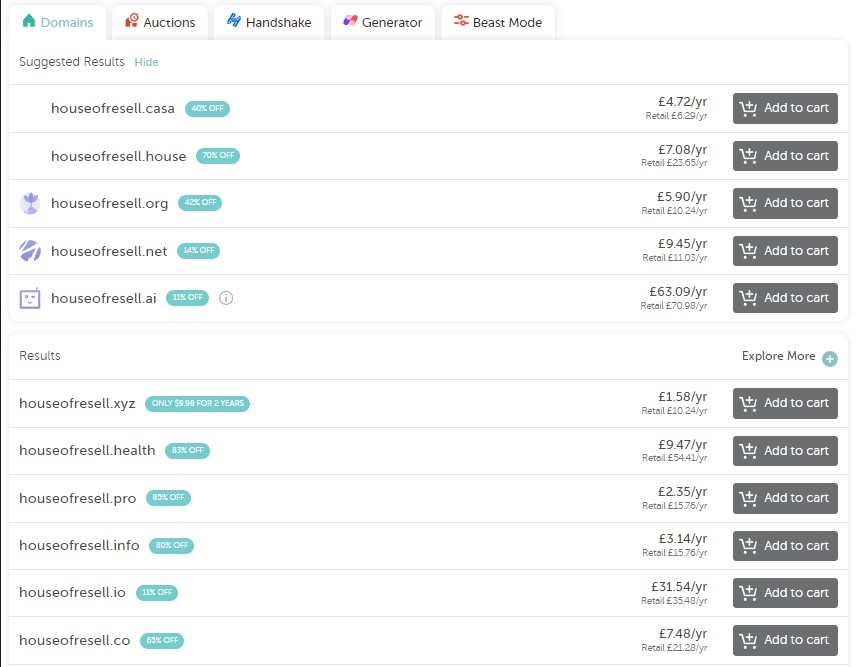
2. Next, head over to Namecheap.com and figure out a custom domain that you would like to use. You can check if they are available via think link: https://www.namecheap.com/domains/domain- name-search/
3. Once you have entered your desired domain, Namecheap will show you which domains are available to buy and their yearly costs.
4. Once you have selected your desired catchall, click add to cart and checkout! Tips: The catchall that you choose does not matter unless you are using it for business purposes. The more obscure the domain and catchall, the cheaper the service will be yearly!
Setting up your Catchall
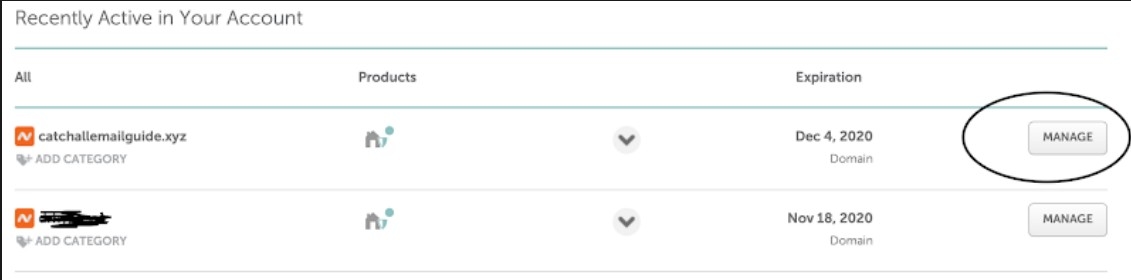
1. Once you've purchased the Domain, go to your Dashboard by clicking on your Account Name and selecting Dashboard. https://www.namecheap.com/myaccount/login/?ReturnUrl=%2Fdashboard
2. Select "Manage" on your desired Catchall and scroll down to "Redirect Email". Click on "Add Catchall" and enter the email address you would like to receive all emails on (This will be your main personal one).
3. It can often take up to 30mins for the process to fully complete. You can check if it is complete by sending an email to your catchall and seeing if it ends up in your inbox.
1.3 Cards
Having a range of credit and debit cards is an essential part of reselling tickets for; cashflow, access to exclusive sales and payout methods in other countries. Furthermore, some countries like Argentina provide discounts on all purchases to payees if paid in foreign currencies which can lead to up to 50% off ticket purchases. Lastly, many countries won’t accept specific card types so having a range of physical and virtual cards to use can be beneficial. Here we will present a range of different options for cards that can be used:
Wise
Link: https://wise.com/invite/dic/thomasa1482
With a Wise Account you can hold a Balance in any of 50+ supported currencies, send payments to 80+ countries, and spend around the world with your linked Wise card. This is beneficial for ticket reselling as it allows you to accept payments from US Ticket marketplaces directly in USD ($). Furthermore, Wise is a specialist in international services and currency conversion and offers the mid-market exchange rate whenever you need to switch from one currency to another. This drives down the cost of sending, receiving and spending foreign currencies so spending in USD with a wise card on sites like Ticketmaster US and AXS.com can save you money.
To open a Wise account and receive a Wise debit card it only costs £7. For this you can generate up to 3 virtual cards which you can purchase multiple tickets on the same site.
Revolut
Link: https://revolut.com/referral/?referral-code=thomas5sxo!SEP1-23-AR-H1
Revolut is a digital bank that allows you to create and upload an online account in which you can make purchases, receive payment and generate virtual disposable cards through their mobile app. With their free membership you will receive a physical debit card and the ability to generate up to 9 multi-use virtual cards and one disposable virtual card. This can be useful to avoid cancellations when purchasing tickets over multiple accounts for a specific event. Furthermore, Revolut offer ticket insurance on their paid premium plan which means you get up to £800 of cover for events per year.
American Express
Link: https://americanexpress.com/en-gb/referral/tHOMAAehW5?XL=MIMNS
American Express credit cards are one of the leading providers in the UK and US due to the benefits you receive whilst spending. Our preferred choice is the AMEX Gold Rewards card (Year 1 - £0, Year 2 onwards - £160 per annum) which provides you with benefits such as 2 complimentary airport lounge visits every year, 20,000 Membership Rewards Points welcome bonus (provided you spend £3,000 in your first 3 months) plus an ongoing earn rate of 1 point per £1 spent. Points can be spent on flight tickets or used to write off charges on your card for ticket purchases. Your eligibility for credit and acceptance is based on your annual income.
While accepting Amex is increasingly becoming the norm, some places still only take Visa or Mastercard. Due to the nature of ticket reselling, with payouts often coming after events, credits cards are a useful tool to more efficiently cycle your money whilst building your credit score. Lastly, American Express support is extremely beneficial, offering a 24/7 service, concierge support and brilliant chargeback help.
Registered Business
If you have a legitimate business or can acquire these accounts by other means, I suggest considering Revolut Business. Depending on whether you've registered as a sole trader or an incorporated entity, you can have a maximum of 200 virtual cards per employee. This ensures a constant supply of cards and offers flexibility in case cards face temporary soft bans (brief suspensions).
Alternatively, you can explore Amex Business as another option. This allows you to generate numerous physical cards at no expense. However, you'll need to create these cards in the names of your family and friends, providing their name, email, and address information.
1.4 US Phone numbers
US Phone numbers are an essential in ticket reselling for creating accounts, signing up for presales and accessing US specific drops. There are multiple providers for US phone number access however there are considerations to be made when choosing which service suits you the best.
VOIP Numbers
A VoIP service provider is a business that offers Voice over Internet Protocol (VoIP) services. VoIP technology allows for IP networks to be used to perform telephonic services, specifically to make or receive calls. These typically are inexpensive in comparison to Non VOIP numbers however are not as successful when entering presales and ballots. Non VOIP numbers are also often clipped (not accepted) or filtered by websites like Ticketmaster during Verified Fan Presale.
Non VOIP Numbers
A non-VoIP phone number is a real mobile number that is associated with a physical SIM card. This type of phone number protects online services, personal numbers, and social media platforms. Although they are more expensive than VOIP numbers, they can’t be filtered in raffles or flagged on systems like Ticketmaster. Many services offer monthly plans for Non VOIP numbers in which you pay a monthly fee per SIM to access all SMS activation codes and texts received during your subscription. These are an essential for Ticketmaster Verified Fans as the presale code is sent to the phone number you sign up with.
One time Use Numbers
Links:
There is a wide variety of one-time use services that allow you to receive a one-time activation code when using their SMS services. These are usually VOIP numbers which is reflected in the cost of their service. This is useful if the phone number is not required later to access login 2fas or text messages for raffles. Many of these services use a credit system in which you top up a set amount of money ($ or Roubles) and each activation costs a small percentage of this.
Monthly Plans
Links:
https://seatheroes.com/ ($7.5)
https://www.phoneblur.com/ ($5)
Monthly plans are the best option if you are planning on scaling in the US. They allow you to receive unlimited SMS across a 30-day period to a Non VOIP number. Furthermore, these services provide a dashboard for you to monitor received SMS messages aligned with the number that received them. For more expensive plans, you have access to Area Code Selection which you can match with the location of the event for a better chance of success when receiving Verified Fan codes.
1.5 Creating Multiple Profiles
Unique Information
In order to obtain the maximum profit on ticket drops we need to purchase tickets on multiple accounts to bypass the ticket limits imposed on us. To do this we require accounts with unique information. This section talks about what unique information you need and where to obtain it from.
Card Numbers
Each account will require its own unique card number to ensure that we don’t get cancelled. We can obtain unique card numbers from bank account and credit card providers.
Names
Each account will need to use unique names. Please do not create fake names etc because this is illegal. Use friends and family names with their consent to create multiple profiles, each profile must be real.
E-Mails:
Each account will need a different email. We can use catchalls on most websites to create multiple profiles. See catchall guide for more info.
Addresses
Each address will need to be unique. Please do not use fake addresses etc because this is illegal. Use friends and family addresses with their consent. For any number of tickets over the ticket limit you will need your accounts to have unique addresses when you buy so there is very minimal chance of cancellations.
Phone Number
Each account will need to have a unique number. Please do not use fake numbers etc because this is illegal. Use friends and family numbers with their consent. See US Phone number guide for more info.
2. Buying Tickets 2.1 Considerations
Websites we buy Tickets on:
We will primarily purchase tickets from two platforms: AXS and Ticketmaster. Nevertheless, occasionally, we might encounter ticket releases on venue specific websites. It's crucial to note that Ticketmaster and AXS are interlinked, with Ticketmaster frequently utilizing AXS's flash delivery system for ticket distribution. Consequently, it's highly advisable to employ distinct email addresses and billing information when participating in the same ticket release on both Ticketmaster and AXS. For websites that are not directly stated in this master guide, information on the event post will be provided with a step-by-step guide.
Type of Ticket Drop:
We typically experience various types of ticket releases, with the most common ones being waiting room drops (queues) and first-come, first-served drops. I'd say there's an even distribution of both types, but we tend to see more waiting room drops on AXS and a mix of both on Ticketmaster. Ticketmaster typically reserves waiting room drops for larger artists. To maximize your chances of success, it's highly advisable to be as punctual as possible and join the waiting rooms the moment, they become available, with Sessionbox tabs ready to go. This significantly enhances your chances. Please refrain from trying to join five minutes before the drop, as your chances of obtaining tickets decrease, and the best ticket options may have already been taken.
The other type of ticket release, although less common, involves entering raffles. While this doesn't happen frequently, it may occur for certain releases where we simply complete entry forms and use catchall email addresses to increase our chances of being selected.
Type of Sale:
Events typically don't release all their tickets in a single day; instead, they're spread out over multiple drops, providing you with multiple opportunities to secure them. The most common types of drops include Artist Presales (often requiring a signup code), Spotify Presales, Amex Presales (usually restricted to Amex cardholders, especially at venues like the O2), Citi Bank presales (requiring a Citi Bank card), and General Sale (open to anyone). Consequently, you often have more than one chance to purchase tickets for an event. Priority sales and Amex presales tend to be more accessible due to their limited access, while General Sale can be more challenging. Having multiple chances to secure tickets means you shouldn't rush to buy undesirable seats due to fear of missing out during the first drop.
Ticket Limits:
Each event sets its own ticket limits, which are determined by the event promoter or organizer and enforced by platforms like Ticketmaster and AXS. It's crucial not to exceed the ticket limit per account, as this can result in your orders being cancelled. You can make multiple purchases on the same account with the same details, as long as you stay within the event's specified ticket limit. For instance, if the event's limit is 6 tickets, this means a total of 6 tickets, regardless of whether they are standing or seated, so long as the total does not exceed 6.
Which Tickets to Purchase:
I strongly recommend buying only the tickets recommended by our ticket staff for each drop, especially if you're new to this market and lack the expertise to make informed decisions. Before every drop, there will be a guide outlining the most desirable tickets. From my experience, I've found that the cheapest tickets per event and floor tickets (whether standing or seated) tend to perform the best due to high demand. However, always double-check with our ticket staff for confirmation on which tickets to buy for each event.
Additionally, it's essential to avoid buying odd numbers of tickets whenever possible. Tickets are typically easier to sell in pairs or multiples of twos rather than individually. Therefore, unless it's an extremely high demand drop, refrain from purchasing single tickets to avoid getting stuck with them and having to sell them at a lower price.
Other tickets to strongly avoid:
- Disabled tickets also referred to as access tickets. - Bus passes - Restricted view (these are tickets with a limited view of the stage) - Hospitality or premium tickets (unless stated otherwise in our posts)
2.2 Ticketmaster US
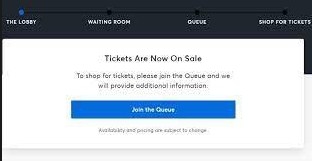
1) Ticketmaster US utilizes the Ticketmaster Smart Queue which requires an SMS or Email one time password to be entered in order to join the queue on each account. Using a catchall or a SMS Dashboard can speed up the process. Ensure you using Sessionbox to join on multiple account under different IP addresses. If you are looking to scale this process, ensure you are prepared 15 mins before the drop as it can sometimes take 2+ mins to receive an OTP.
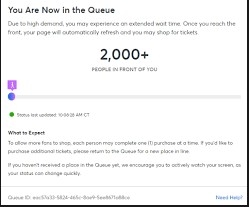
2) Once you have entered the queue you will be given a unique Queue ID which will determine your place in the queue.
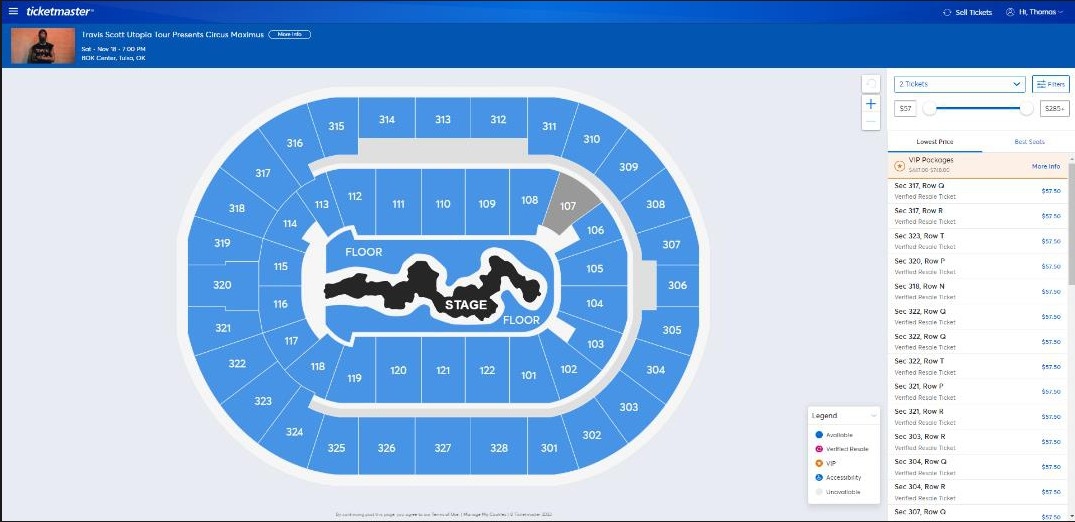
3) Once through the queue you will be presented with the Hallmap for the venue alongside a separate menu that initially ranks the tickets available in order of price. The hallmap is interactive so if you wanted to buy a specific section, you can click on it. Furthermore, there is a drop-down tab to determine the number of tickets you desire and a “filters” tab to remove VIP, Resold and Premium tickets from the display.
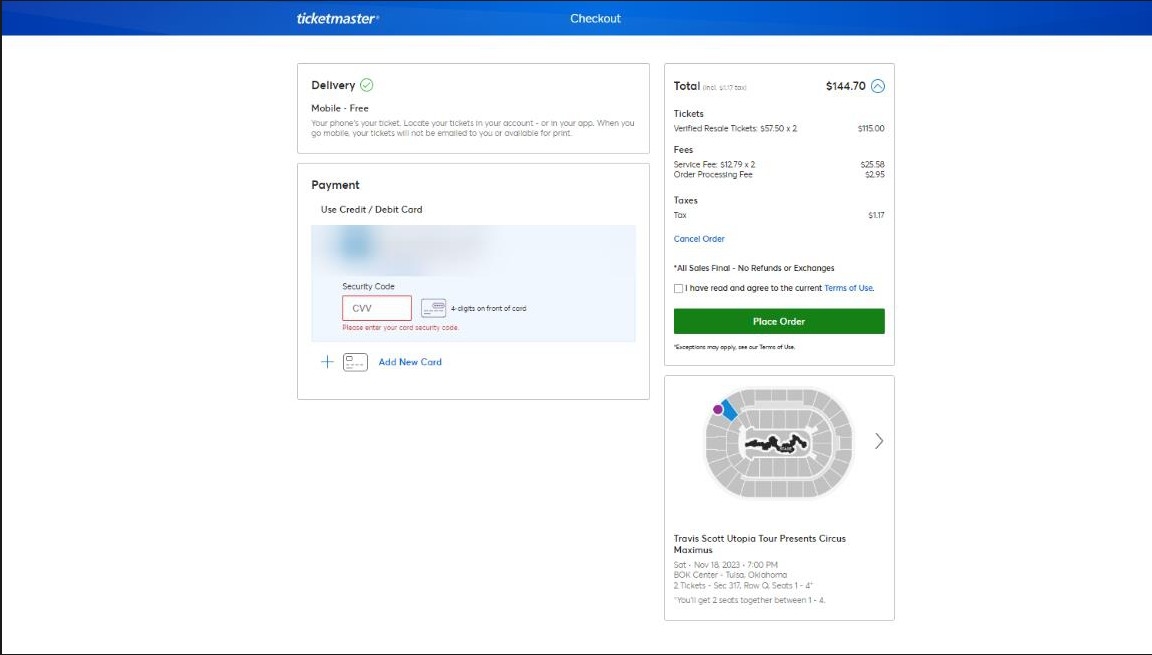
4) Click on the tickets you desire, click “Next” and the tickets will be added to your cart. For most drops you will have a 5 minute ‘cart hold’ period in which the tickets you have selected can’t be carted by anyone else. During this period ensure you are carting other tickets on your other accounts whilst they are still in stock. To improve the speed of this process, ensure each account has a credit card added and a billing address here:
5) Once you have checked out your tickets, they will appear in your account here:
https://my.ticketmaster.com/orders. If they don’t appear initially, please wait up to 5 minutes.
2.3 AXS.com
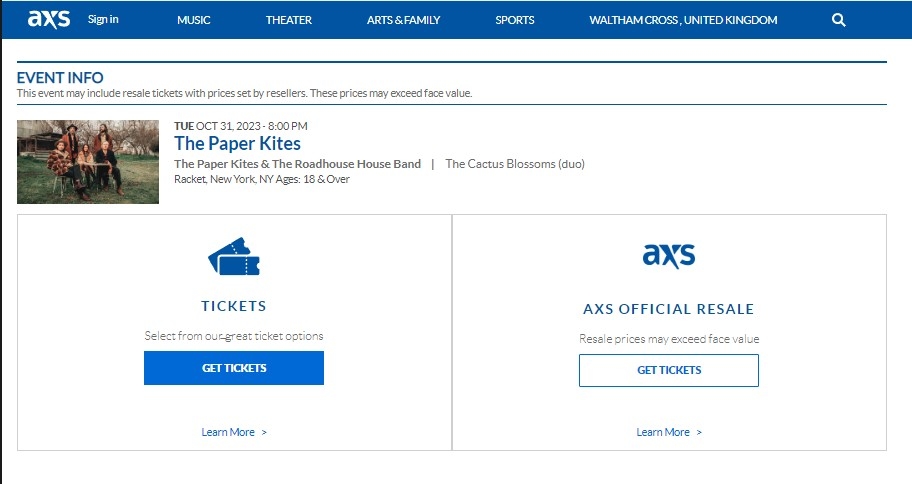
1) Open your web browser and go to the official AXS website at https://www.axs.com/ and ensure you are logged into your account. Located the event link within the guide and wait for the waiting room to open. After selecting the event, you'll be taken to the event page. Here, you can see event details, including the date, time, and venue.
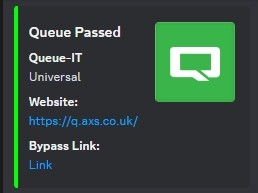
2) If an event is using Queue-it in conjunction with AXS, you'll encounter an additional step in the ticket-buying process. Queue-it is a virtual waiting room system that some event organizers use to manage high-demand ticket sales. Fortunately enough for our members, the queue-it waiting room system can be bypassed using software which we provide within the server. In this occasion, click the “Bypass Link” within the #Queue-bypass channel 1-2 mins after the drop has gone live to avoid waiting in the queue.
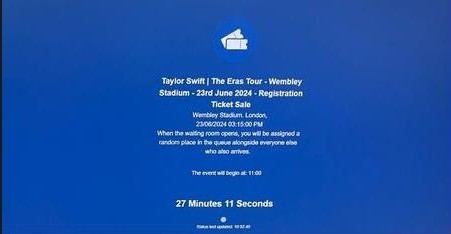
3) If the queue bypass is not being ran for a specific event simply wait through the queue. Your position in the queue is random, so it's not necessarily first-come, first-served. You'll be automatically redirected to the purchase page when it's your turn. Do not refresh the page or open multiple browser tabs, as this may result in losing your place in the queue.
4) Once you have bypassed the queue you will be presented with either an automatic ticket allocator or you will have to manually select the specific seats within the stadium that you desire. The Automatic ticket allocator allows you to select the type of ticket and amount of tickets you want and it will delegate the tickets based on the availability within the stadium. However, when AXS enables the manual selection feature, you will have to manually select the specific seats within the stadium that you desire. This can be a lot slower and leave you with errors when other attempt to cart the same tickets as you.
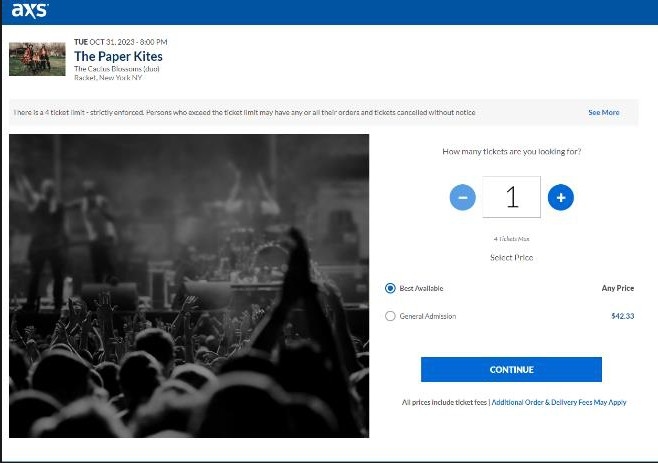
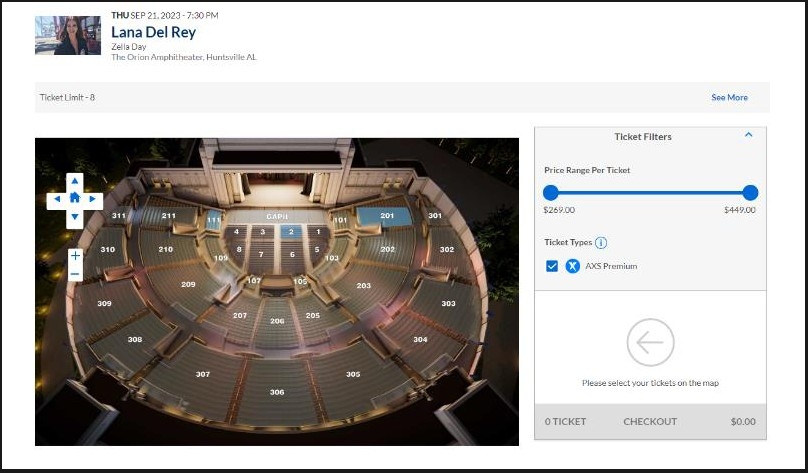
5) Once you have carted your desired tickets in conjunction with the specialised event guide, you are able to complete your purchase. Ensure you don’t go over the limit for the maximum quantity of tickets allowed per account (this will be stated in the guide). To access your tickets, Follow the instructions provided in the confirmation email or on the AXS website.
2.4 Ticketmaster Verified Fans
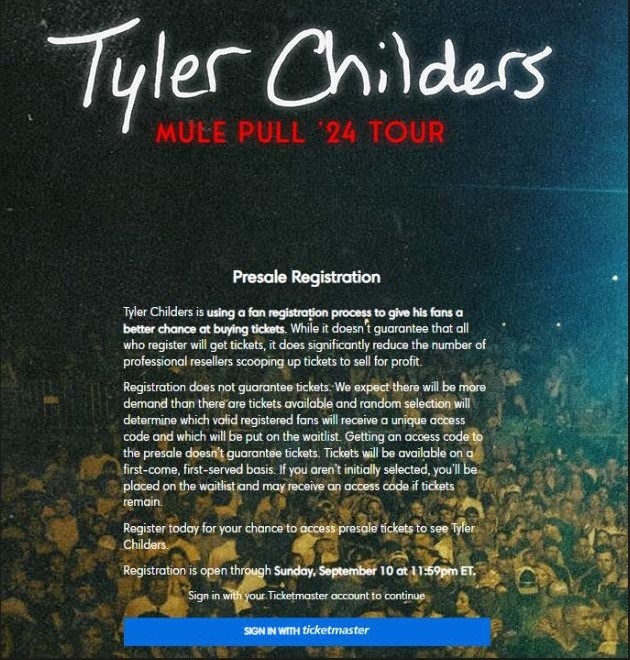
Ticketmaster’s Verified Fan system is a raffle-based system in which fans can enter for a chance to secure a unique code to use to Verified fan presales. The raffle usually goes live 1 week before the event sale dates. The unique code received does not guarantee you a ticket however it does increase your chance as less people can access the sale.
How it works:
Step 1: You Register
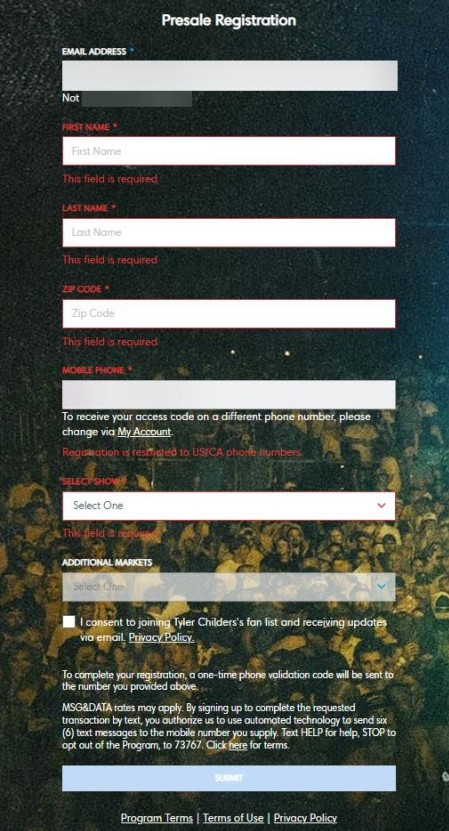
Fill out the registration form by signing in to your account, pick your preferred show(s) and let Ticketmaster know how to contact you. Ticketmaster authenticates each registration to ensure it belongs to an individual — not a bot.
Step 2: You’re Selected or Waitlisted
Fans are randomly selected to get access to the sale. Those not selected are put on the waitlist — both groups are notified by email the day prior to the sale.
Access: You’ll get to join the sale using a unique access code sent via text. This code only works when used with your account — it can’t be bought or sold.
Waitlist: You won’t be able to join the sale this time around. If someone doesn’t show up for the sale or more tickets remain, you may be randomly selected to get a spot and a code will be sent via text after the sale is underway.
How to improve your chances?
1) Ensure you are using Non VOIP phone numbers to enter the sale that match the location of the event. For example, if it is an event located in Las Vegas, ensure you are using a US number, more specifically one within the Nevada area.
2) Enter multiple times with unique info including name, ZIP code, email (non catchall) and phone number.
3) Ensure your ZIP code that you enter matches the closest preferred venue that you have selected.
3. Selling Tickets
3.1 Selling Tickets Overview
When to sell
Generally, ticket prices are highest a month before the event and straight after the release. I recommend listing up tickets on sites such as viagogo as soon as you have purchased for a high price, you can always lower your pricing later. Never undercut, always list higher.
With some releases you can send tickets to the buyer / upload to platforms directly after the event saleothers you have to wait until a few days before the event to send them. You are able to list tickets for sale before you receive them.
*Please note when listing tickets for sale the display price on resale sites may be higher than the price you listed for as sites such as Viagogo charge the buyers additional fees.
Where to sell
There are multiple ticket marketplaces within the US that charge varying rates on each sale including but not limited to:
- Stubhub - Ticketmaster+ - Vividseats - Seatgeek - FanXchange
Quantity to sell in
When selling your tickets you will be given the option on how to divide the quantity to access different sales. The most common way to sell your tickets is in pairs or quads, sticking to even numbers to ensure you are not left with 1 ticket. Alternatively, because most touts list in quantities of 2/4/6s there is often a shortage of trios on the market meaning the price is often higher. It is always important to check each marketplace for price differentiation by quantity to ensure you are getting the best price for your tickets.
What price to list at
Ensure you are never undercutting the market when listing your tickets. List 2/3 places higher than the lowest ask for in demand events to benefit when prices rise. You can always lower the price of your tickets nearer the event date if they are not selling When will I get paid?
You will receive payment on US sites once the order is fulfilled and the buyer has received the tickets. This is a huge benefit in comparison to UK tickets as you are able to recycle your capital. Ensure when buying tickets you check for transfer delays as this will increase the time you have to wait for payout. See Lysted guide for further info
3.2 Lysted Guide
What is Lysted?
Lysted is an online comprehensive ticket resale platform that’s allows customers to list their tickets across multiple marketplaces to achieve higher prices and quicker sales. Using its historical sales data, customers can accurately price their tickets to remain competitive on the market. In addition, using Lysted’s smart management features, it can automatically import your tickets into your inventory from your Ticketmaster account, fulfil your order once sold and automatically delist your tickets from other marketplaces. Your sales are the aggregated in the “sales” tab of the dashboard to easily track your profits in one place. You will receive early payouts, 2 weeks after you sell the tickets and fulfil them.
Fees associated with Lysted
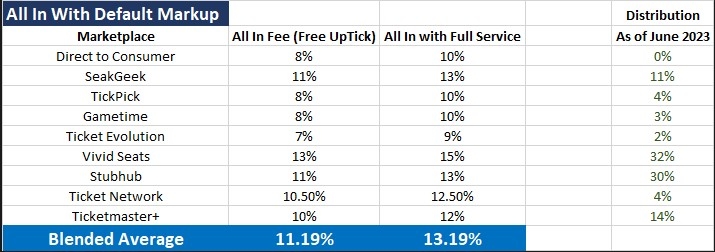
How to use Lysted Demo series:
https://www.youtube.com/playlist?list=PLjAv3I_zcFi3TUFHZVMcr7KdKZ27XDLO-
The above demo series was curated by Lysted to navigate you around the dashboard and learn how to utilise their smart inventory management, track sales history, Fulfil orders and much more. Here they also break down the Fees associated with each sale which is key when managing competitively priced tickets. Ensure you watch this full series (13 episodes) which will take you around 45 minutes.
Lysted Setup Guide
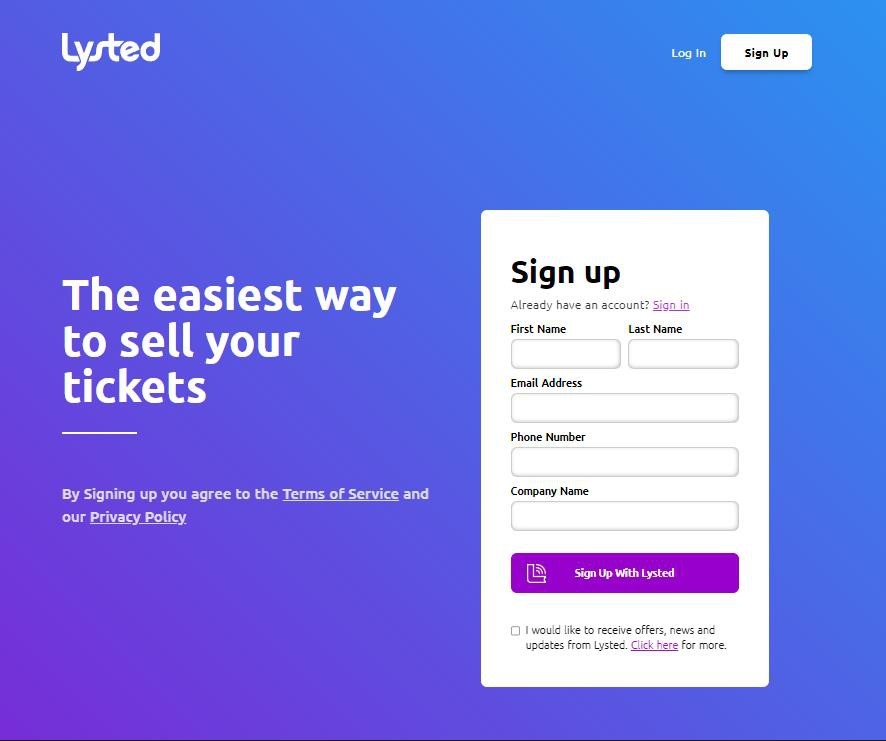
1) In order to begin your Lysted setup head over to https://lysted.com/signup an enter your details. You will be emailed a link to confirm your signup.
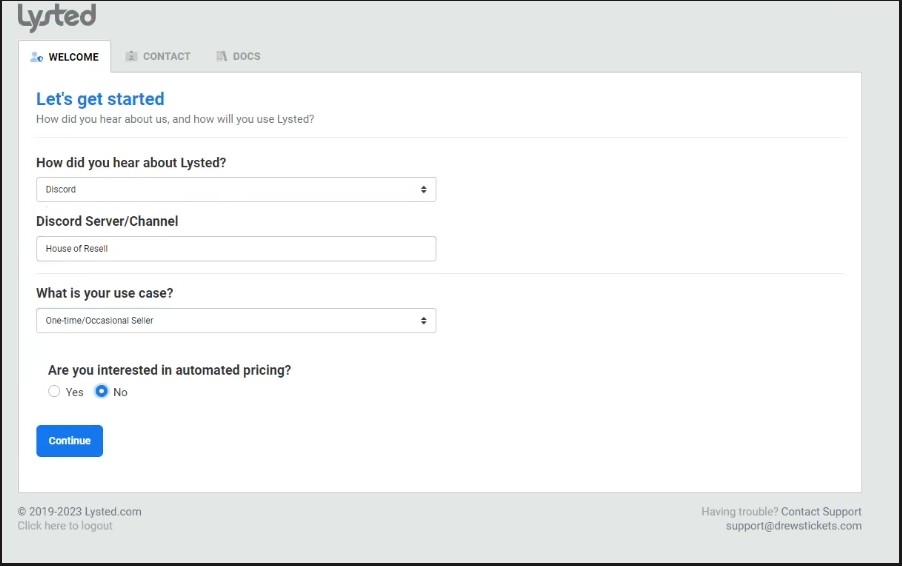
2) Next you will be prompted with a “Lets get started” Tab. Here you can enter anything into the “How did you hear about us” and “User case”. It will not impact your account
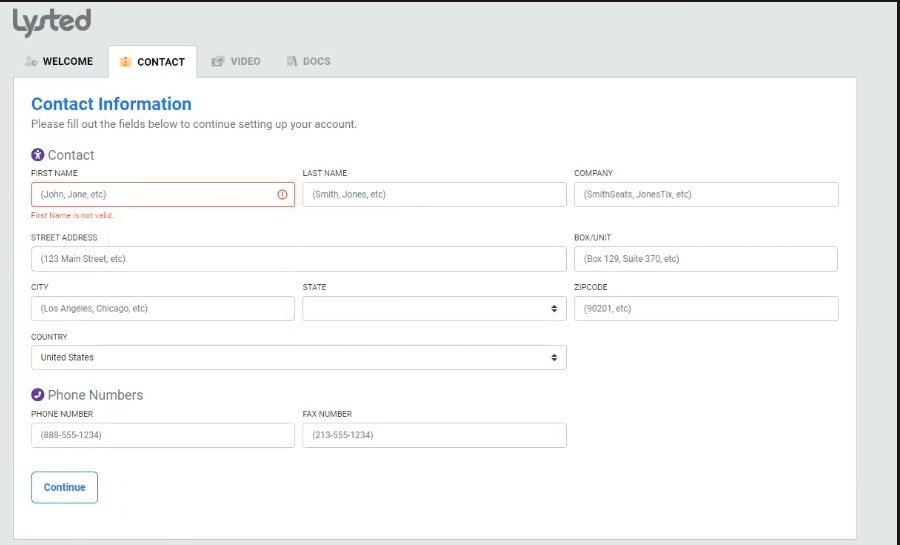
3) Next you will be prompted to enter your customer account details. You can now use your UK address for the account as well as your UK Phone number. Ensure you click “United Kingdom” as the country to remove the need to enter a state. Fruthermore you are not required to enter a Company name or Fax number here.
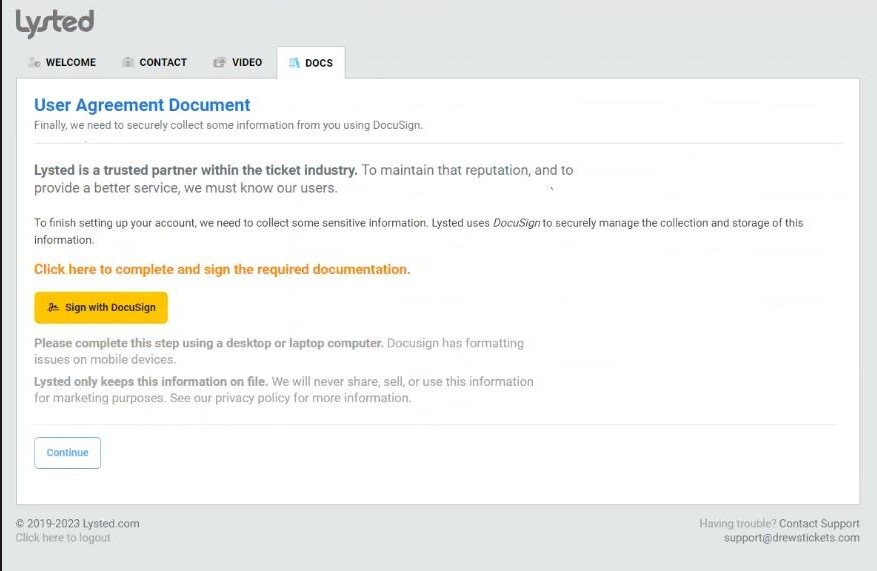
4) Finally you will be required to complete Document signatures to verify your account. For the first 3 documents enter your Full name and sign at the bottom.
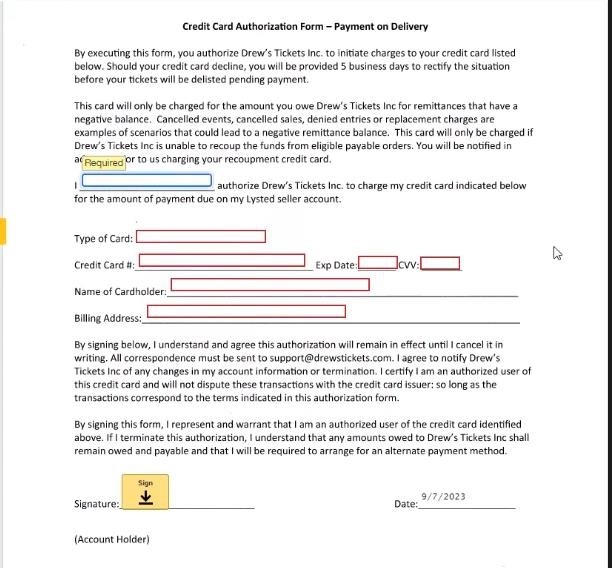
5) The fourth and final document will require you to enter card details as collateral for not fulfilling tickets. Here you can use a disposable Revolut card.
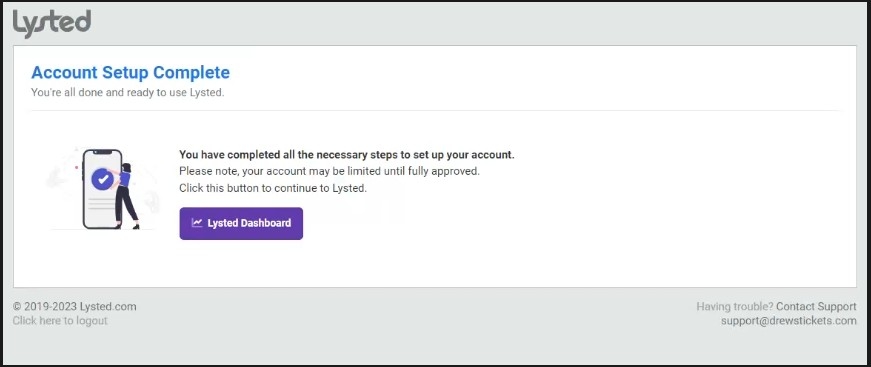
6) You have now completed your Lysted Sign up process. It will take between 1-3 days to verify your account with Lysted before you are able to sell tickets.
3.3 Delivery Methods
How do I Identify what my ticket type is?
Ticket categories are readily distinguishable.
Throughout the checkout procedure, you'll receive clear indications of whether your ticket falls under the category of an electronic ticket, mobile ticket, or physical ticket. Additionally, your email confirmation will typically specify the type of ticket you've purchased. Event ticket vendors, such as Ticketmaster, also furnish information about event restrictions on their event pages. Simply click on the information icon (i) on the event page to access these details.
If any special measures necessitate the involvement of a "lead booker" or require account surrender, we will include this information in our event descriptions.
Mobile Transfer
Mobile transfer is when are transferred directly via a website or an app. If the tickets are mobile transfer through Ticketmaster / AXS transfer system whereby tickets are sent from your account to the buyers, you usually require their name and email. A transfer button will show on the app if this is an available option. If the app / website displays "transfer unavailable" it typically means that it will be available closer to the event.
Mobile Tickets
Mobile tickets are dynamic QR codes that are downloaded onto your phone via the vendors app e.g. the Ticketmaster app. These tickets are used most often and are easy to distribute if the transfer feature is enabled. These tickets are often found in the account of the site that you purchased said tickets off. Once you have located these tickets you will be given the option to transfer these tickets to a buyer’s email (if you have sold on Viagogo or Stubhub you will be provided with this).
Etickets
E-tickets are when you are provided with a QR code or pdf which can be accessed or downloaded from the website you purchased the tickets from or via an email you are sent. If the tickets are sent as a PDF, you can send to buyers or upload to platforms directly. If the tickets are not a pdf and are either a QR code in an app or not a pdf format you will need to use an online converter such as https://www.freepdfconver or any other online converter, simply google pdf converter. After converting you will then be able to upload the file to viagogo or other sales platforms.
Please note that If the QR code is in an app and the barcode itself does not change you are able to screenshot. However, if the barcode changes you will not be able to send a screenshot you will either have to deliver the tickets via mobile transfer or account surrender.
If you purchased tickets and sold in separate orders e.g., purchased 4 tickets you will need to split the pdf using a programme such as pages, word, google docs. Some platforms will allow you to select specific tickets from a file upon uploading. Just ensure you do not send the same tickets out to separate buyers.
Print at Home Tickets
These tickets are extremely easy to distribute and this why we prioritise them. A pdf will either be emailed to you or be downloadable off your account with the vendor you purchased from. Once downloaded you can then upload these tickets to your buyer via your chosen selling site e.g., Viagogo or Stubhub. If you have 4 tickets on one pdf but 2 sales, you can always use a pdf splitter such as Adobe Acrobat.
Lead Booker
Lead booker tickets are where you will have to accompany the buyer to an event. These can also be referred to as "walk ins". These events are where there are ID checks for the lead booker in place and transfer of tickets is disabled. Typically, when ID checks are stated as being in place they are not actually enforced. These events being called by us are fairly rare but when they are worth your while. Due to the checks in place, you can typically charge considerably more for these events.
What If Transfer Is Unavailable?
In the unlikely event that this option is unavailable, if your tickets are on Ticketmaster, you can get around this by downloading the tickets to your apple wallet then going to wallet > select the tickets > click options and turn automatic updates off. The screenshotting the ticket and uploading this to your buyer via the site you sold on e.g., viagogo or Stubhub a detailed introduction to this will be found later in the guide.
If your tickets are not on Ticketmaster and on sites such as Eventim and AXS an account surrender is your only option. An account surrender is when you give the buyer the login to the account you purchased tickets off. We do not advise this if you have other tickets on this account as it can be extremely risky.