
Reselling Tickets: UK Tickets Guide
Contents
1. Ticket Essentials
1.1 FAQs
1) What is ticket reselling?
Ticket reselling is the process of buying and selling tickets after their original purchase, usually through a resale marketplace or private seller.
2) Is ticket reselling legal?
Ticket reselling is legal in many countries, but rules vary depending on local laws, the event type, and venue restrictions. The UK have stated they will ban reselling above face value but that isn’t in place yet. Here is a good website to check https://stopresalerobbery.org/laws-in-your-country/
3) Can resale ticket prices go down closer to the event?
Yes. This depends on demand and may rise or go down closer to the event.
4) What happens if an event is cancelled or postponed?
Most resale platforms offer refunds or credits for cancelled events. Policies for postponed events may vary. Usually in the event of a postponed event, the platforms will keep your sale, and pay out after the new event date.
5) Are resale tickets transferable?
Many resale tickets can be transferred digitally through official ticketing apps. This is for most events, but not all.
6) How do I transfer my tickets?
Usually on Ticketmaster/AXS etc. you can just go to your tickets, hit transfer, enter an SMS confirmation, and then transfer using full name and email. You can find the buyer’s full name and email located in your sale details on Viagogo/StubHub etc.
7) Can I get a refund on resale tickets?
Refund eligibility depends on the platform’s policy and the event status. Most sales are final unless the event is cancelled.
8) How are ticket prices determined on resale marketplaces?
Sellers set prices based on market demand, ticket availability, and seat quality.
9) What payment methods are accepted?
Most resale platforms accept major credit/debit cards, digital wallets, and secure online payment methods. Sometimes you can get access to presales with a certain type of card e.g. AMEX.
10)Should I buy ticket insurance when purchasing tickets for resale?
We never recommend buying this, as the extra costs add up a lot, and the requirements for getting a claim on this insurance are quite complex (requirements of official doctors notes etc.)
11)What if I sell my E-Tickets to multiple buyers and need to split the PDF?
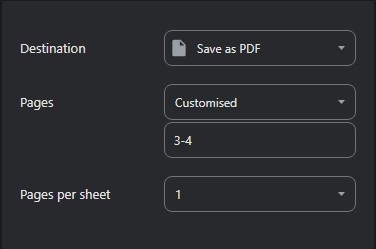
You can do this by opening the PDF, clicking CTRL + P on your keyboard and then selecting Save as PDF as the ‘Destination’. You will then have to change ‘Pages’ to “Customised” and select which pages you want to save as a new PDF, and then hit ‘Save’. Repeat this for all the tickets you need to split.
1.2 Catchall and Gmail Forwarding
What is a catchall?
A catchall account is an email address that collects all mail sent to your domain, even if the specific recipient address does not exist on the server. Any email sent to recipients at your domain will be "caught" by this account.
Example: [email protected]
How can we use this in Ticket Reselling?
These can be used to create unique accounts for releases to have better/more chances of success and to be able to get more tickets. Each account should be set up with unique details, including unique emails.
How to create a Catchall
1. Create an account on somewhere like Namecheap or GoDaddy
2. Next, search for your desired domain on those websites.
3. Once you have entered your desired domain, they will show you which domains are available to buy and their costs.
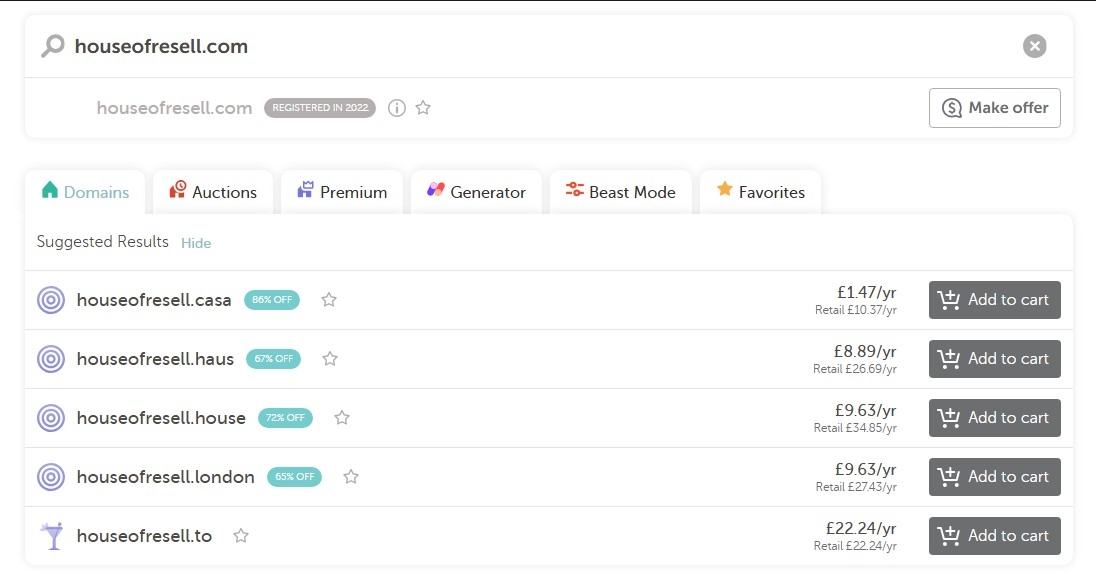
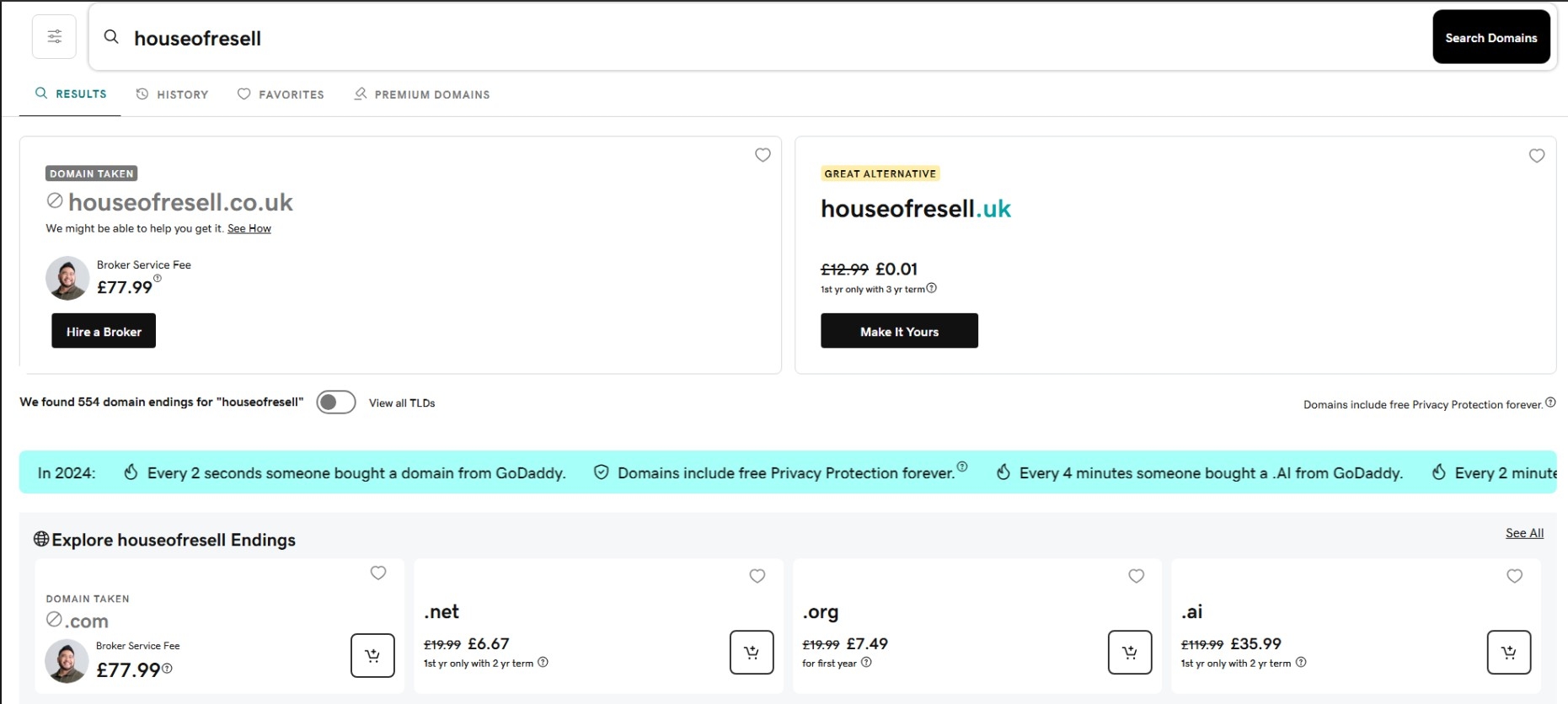
4. Once you have selected your desired domain, click add to cart and checkout.
Tip: The catchall that you choose does not matter unless you are using it for business purposes. The more obscure the domain and catchall, the cheaper the service will be!
Setting up your Catchall
Namecheap Catchall Setup
1. Create an account or Log in to your Namecheap account and navigate to the Dashboard
2. Go to Domain List, find your purchased domain, and click Manage.
3. Select the Advanced DNS tab and scroll to the Mail Settings section.
4. From the dropdown menu, choose Email Forwarding and click the green checkmark icon to
save.
5. Navigate to the Domain List again and click the Email icon next to your domain. This opens
the Redirect Email section.
6. Click Add Catchall and enter the main personal email address you want to receive all emails
on (e.g., your personal Gmail).
7. It can take up to 30 minutes for the forwarding to fully activate. You can test it by sending an
email to an arbitrary address at your new domain (e.g., [email protected]).
GoDaddy Catchall Setup
8. Log in to your GoDaddy account and navigate to the My Products page.
9. Find your domain and click Manage or the gear icon next to it.
10.Go to the Email & Office section and look for Email Forwarding.
11.Set up a new forwarding rule. To create a catchall, the "forward this address" field should
typically use an asterisk ‘*’ or a similar wildcard, ensuring all mail to your domain is caught.
12.Enter your main personal email address as the destination for the forwarded mail.
13.GoDaddy's setup may take a few minutes.
1.3 Cards
Having a range of credit and debit cards is an essential part of reselling tickets. This is mainly for:
1) Cashflow
2) Access to exclusive
sales 3) Having multiple cards for different accounts
Below is a list of places where you can get more cards, and in some cases, multiple cards within the same account. Some are for normal accounts (if you are self employed), and some are the business versions (if you have a limited company). Note that the links are referral links, and if you complete the right steps, you’ll be able to earn a bonus.
Wise
With a Wise account, you can hold and spend in 40+ currencies, send money to 140+ countries, and use your linked Wise debit card in over 150 countries worldwide. UK users can open an account for free, and ordering the physical Wise card currently costs a one-off £7 fee with no monthly subscription charges.
You can also create up to 3 free virtual cards at once, making it useful for managing separate online purchases or buying multiple tickets securely on the same website.
Revolut
Revolut is a digital banking app that lets you hold money, make payments, receive transfers, and create virtual cards directly from your phone. With Revolut’s Standard plan, you can access both multi-use virtual cards and a disposable virtual card that automatically refreshes its details after each purchase for added security.
Virtual cards are free to create and can be useful for organising online purchases or adding an extra layer of security when buying tickets and shopping online. You can create up to 20 virtual cards, with a limit of 4-5 new ones per month.
Revolut also offers paid plans with additional perks, including purchase protection and event cancellation cover on eligible bookings, subject to policy terms, eligibility requirements, and coverage limits.
Revolut Business
Revolut Business is a digital business banking platform that lets companies hold and exchange multiple currencies, send and receive international payments, and issue physical or virtual cards to team members. Businesses can create up to 50 virtual cards per employee, making it useful for managing subscriptions, supplier payments, advertising spend, and online purchases securely.
- https://business.revolut.com
American Express
- Gold Card https://americanexpress.com
- Platinum Card https://www.americanexpress.com
American Express is one of the UK’s most popular rewards credit card providers, particularly for travel and points benefits. The Preferred Rewards Gold Card is free for the first year and then £195 annually, offering Membership Rewards points on spending plus four complimentary airport lounge visits each year. For more frequent travellers, The Platinum Card (£650 annually) includes unlimited airport lounge access worldwide, hotel status benefits, comprehensive travel insurance, and additional lifestyle perks.
Membership Rewards points can be redeemed for flights, hotels, statement credit, and more. Credit cards can also help manage cash flow where payouts arrive later, while building credit history when used responsibly. American Express is also well known for its 24/7 customer support, fraud protection, and strong chargeback service, although some retailers still only accept Visa or Mastercard.
American Express Business
American Express Business cards are designed for companies and self-employed users looking to earn rewards while managing business spending. Popular options such as the Business Gold and Business Platinum cards offer Membership Rewards points on eligible purchases, employee cards, spending controls, travel benefits, and expense management tools. Business cards can also help improve cash flow by allowing companies to spread costs more efficiently while benefiting from Amex customer support, fraud protection, and chargeback assistance.
- Gold Business Card https://americanexpress.com
1.4 Creating Multiple Profiles
Unique Information
In order to obtain the maximum profit on ticket drops we need to purchase tickets on multiple accounts to bypass the ticket limits imposed on us. To do this we require accounts with unique information. This section talks about what unique information you need and where to obtain it from.
Names
Each account will need to use unique names. Please do not create fake names because this is illegal. Use friends and family names with their consent to create multiple profiles, each profile must be real.
Addresses
Each address will need to be unique. Please do not use fake addresses because this is illegal. Use friends and family addresses with their consent. For any number of tickets over the ticket limit you will need your accounts to have unique addresses when you buy so there is very minimal chance of cancellations.
Emails:
Each account will need a different email. We can use catchalls on most websites to create multiple profiles. See the catchall guide for more info.
Card Numbers
Each account will require its own unique card number to ensure that we don’t get cancelled. We can obtain unique card numbers from different bank account and credit/debit card providers.
Phone Number
Each account will need to have a unique number. Please do not use fake numbers because this is illegal. Use friends and family numbers with their consent. See US Phone number guide for more info.
1.5 Creating Chrome Profiles
1) Open Google Chrome.
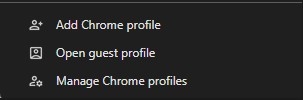
2) At the top right, select your Profile. This is usually a circle icon with your initial or a profile picture next to the three-dot menu:

3) Select Add (or Add Chrome profile). This opens a new window where you can set up a completely separate browser environment.
4) Choose a name, photo, and color scheme for the profile. Critically, the name you choose here should match the unique name (e.g., from a friend or family member) that you are using for your reselling account, as outlined in the "1.4 Creating Multiple Profiles" section. This is essential for keeping your accounts organised.
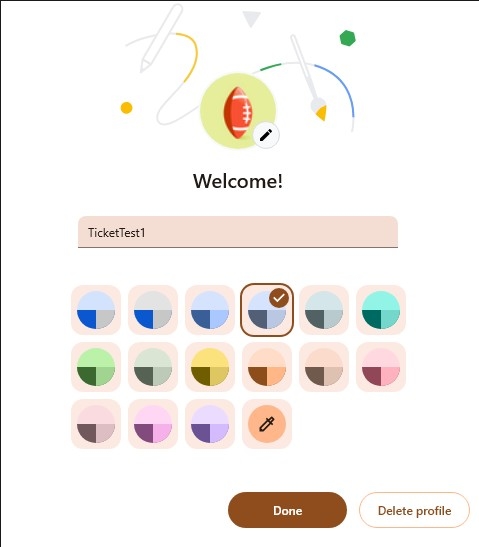
5) It’s recommended to link the chrome profile to a specific email, and have your Ticketmaster, AXS etc. accounts with that email, logged into that chrome profile. Then when you are going for releases, you can open all the profiles you need by again clicking your account icon at the top right, and then clicking on the chrome profile you wish to open.
2. Buying Tickets
Websites for purchasing tickets
- Ticketmaster
- AXS
- SeeTickets
- Gigs & Tours
- Eventim
- Royal Albert Hall
There are two main platforms for purchasing tickets: Ticketmaster and AXS, but depending on the drop, there may be others, including the ones mentioned above. For websites that are not directly stated in this guide, information on the event post will be provided with a step-by-step guide.
Type of Ticket Drop:
Ticket releases typically fall into two main categories: waiting room (queue-based) drops and first-come, first-served drops. Both are common, although waiting room systems are used more frequently on AXS, while Ticketmaster uses a mix of both depending on the artist and event size, usually queue-based nowadays though.
To maximise your chances of success, it’s important to be ready as early as possible and join the waiting room as soon as it opens. Joining late can reduce your chances of securing tickets, especially for high-demand events where the best seats and ticket types are often taken quickly.
The waiting rooms are usually open 15-30 minutes before the releases.
Type of Sale:
Tickets for major events are rarely released all at once and are usually spread across multiple sales and presale drops, giving buyers several opportunities to secure tickets. Common release types include Artist Presales, Spotify Presales, AMEX Presales, O2 Priority sales, venue presales, and the General Sale.
Some presales require a code, membership, or eligible payment card to access. Amex and O2 Priority presales are often less competitive due to their restricted access, while General Sale is usually the most competitive because it is open to everyone. In our experience it’s definitely worth trying to access the presales to have the best chance of getting tickets. Note that Live Nation and Venue presales usually don’t have nearly as much stock compared to Artist/O2 Priority/AMEX presales.
Ticket Limits:
Each event has its own ticket limit, set by the event promoter or organiser and enforced by ticketing platforms such as Ticketmaster and AXS. Exceeding the stated limit can lead to some or all of your orders being cancelled, so it’s important to stay within the allowed amount.
If an event has a 6-ticket limit, this generally means a maximum of 6 tickets in total across all orders, regardless of ticket type or seating section. The ticket limit is usually per event as well, so if the artist has multiple dates, you can purchase up to the ticket limit for each date.
Which Tickets to Purchase:
We strongly recommend prioritising the ticket types suggested in our drop guides, especially if you’re new to the market or unsure which tickets are likely to perform best. Before each release, we provide guidance on the most desirable sections and ticket types for that specific event.
In general, cheaper tickets and floor tickets (whether standing or seated) tend to see the highest demand and strongest resale performance. However, demand can vary between artists, venues, and cities, so it’s always best to check the latest guidance from our ticket team before purchasing.
Additionally, it's essential to avoid buying odd numbers of tickets whenever possible. Tickets are typically easier to sell in multiples of twos rather than individually. Therefore, unless it's a high demand drop, refrain from purchasing single tickets to avoid getting stuck with them and having to sell them at a lower price. Note that this doesn’t apply to general admission standing tickets.
Other tickets to strongly avoid:
- Disabled tickets (also referred to as accessible tickets) - Bus/car park passes - Restricted view (these are tickets with a limited view of the stage) - these can be good but only if it’s a very good event - Hospitality or premium tickets (unless stated otherwise in our posts)
2.1 Ticketmaster UK
Ticketmaster UK utilizes the Ticketmaster Smart Queue which sometimes requires an SMS or Email one time code to be entered in order to join the queue on each account. Using a catchall or a SMS Dashboard can speed up the process. Ensure you are prepared at least 15 mins before the drop and enter the waiting rooms before the queues go live.
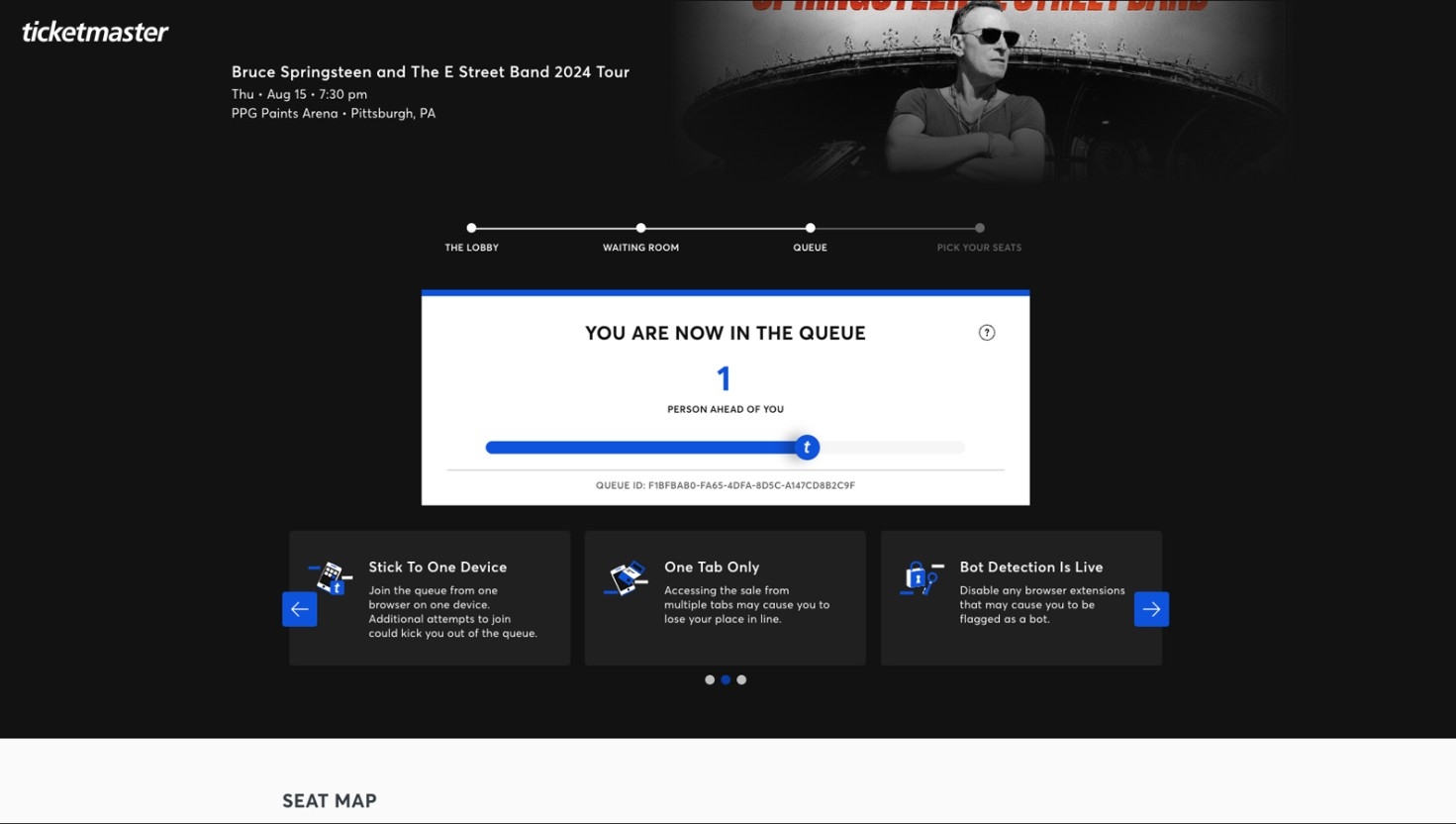
1) Enter the waiting room once it’s live, links will be in the guide. Once you have entered, and when the queue goes live, you will be given a unique Queue ID which will determine your place in the queue.
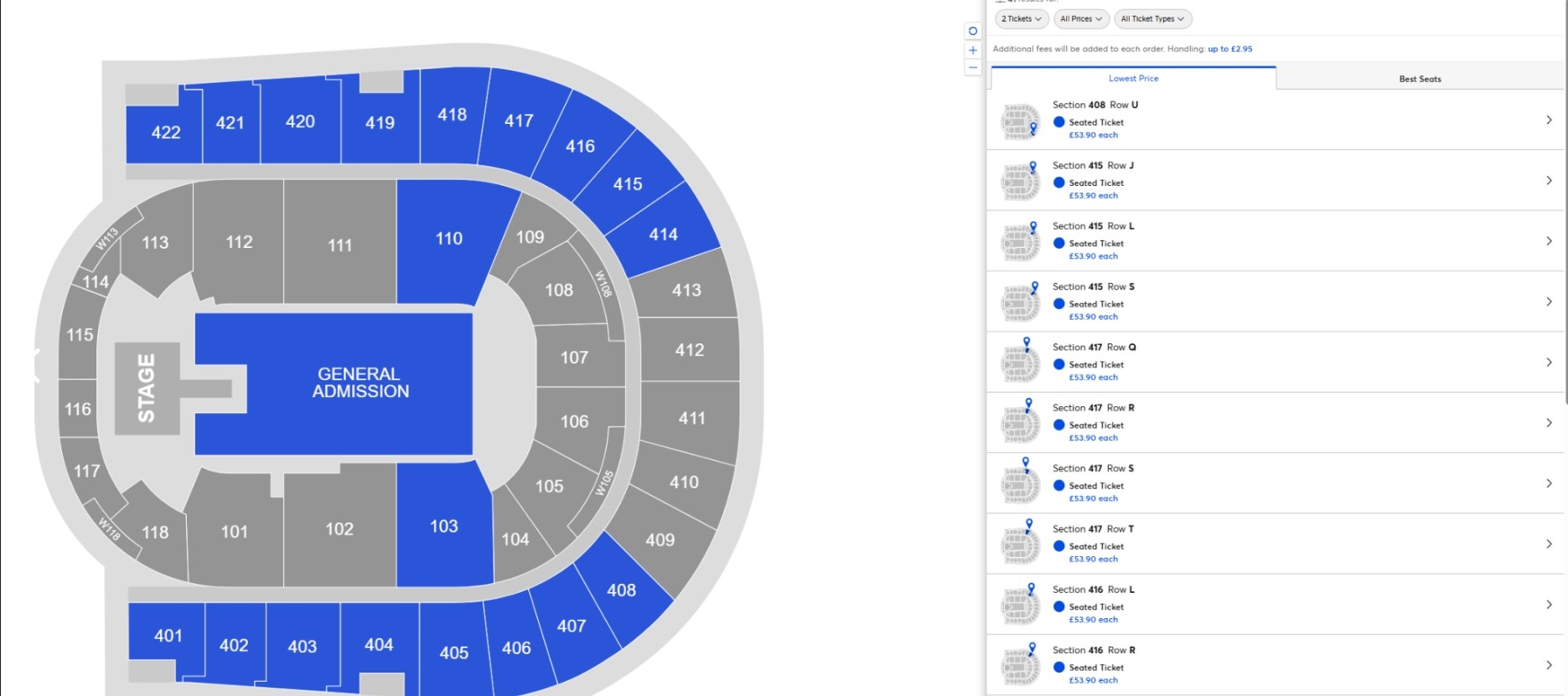
2) Once through the queue you will be presented with the Seatmap for the venue alongside a menu that allows you to select the ticket section you want to purchase. Simply select the amount of tickets you would like to purchase in the desired section and the website will automatically select the best tickets for you according to the settings. Make sure you don’t go over the ticket limit for the event.
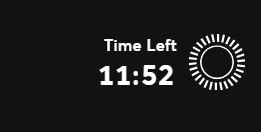
3) Once you have carted tickets, you usually have roughly 10 minutes to fully check them out. Ensure that you complete each step as quickly as you can to avoid losing your tickets. The timer will be at the top-right:
4) If you can’t initially get any tickets, you may be able to catch a restock after people’s carts drop. This may happen around 10-15 minutes into the release.
5) Once you have checked out your tickets, they will appear in your account here:
https://www.ticketmaster.co.uk/user/orders
2.2 AXS UK
AXS UK uses a random queue system. Ensure to use multiple chrome profiles to have multiple chances but don’t do too many on the same IP otherwise you may be blocked. Ensure you are prepared at least 15 mins before the drop and enter the waiting rooms before the queues go live.
1) Enter the waiting room once it’s live, links will be in the guide. When the queue goes live after the waiting room, you will be given a unique Queue ID which will determine your place in the queue. Unfortunately on AXS you aren’t given a number, just a progress bar.
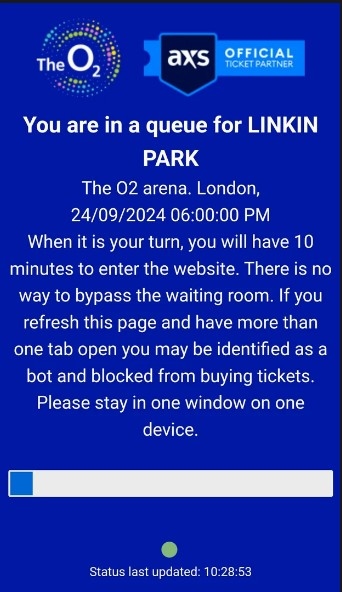
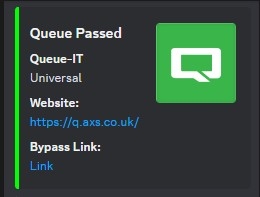
2) They’ll usually use a queue system for the releases. Fortunately enough for our members, the waiting room system can be bypassed. On these occasions, click the “Bypass Link” or “Share Pass” within the bypass channels e.g. axs-1 and axs-2. We will provide details for this on each release if we are able to provide bypasses.
3) If the queue bypass is not being run, simply wait in the queue. You'll be automatically redirected to the purchase page when it's your turn.
4) Once you have bypassed the queue you will be presented with a seatmap where you can select tickets from the map.
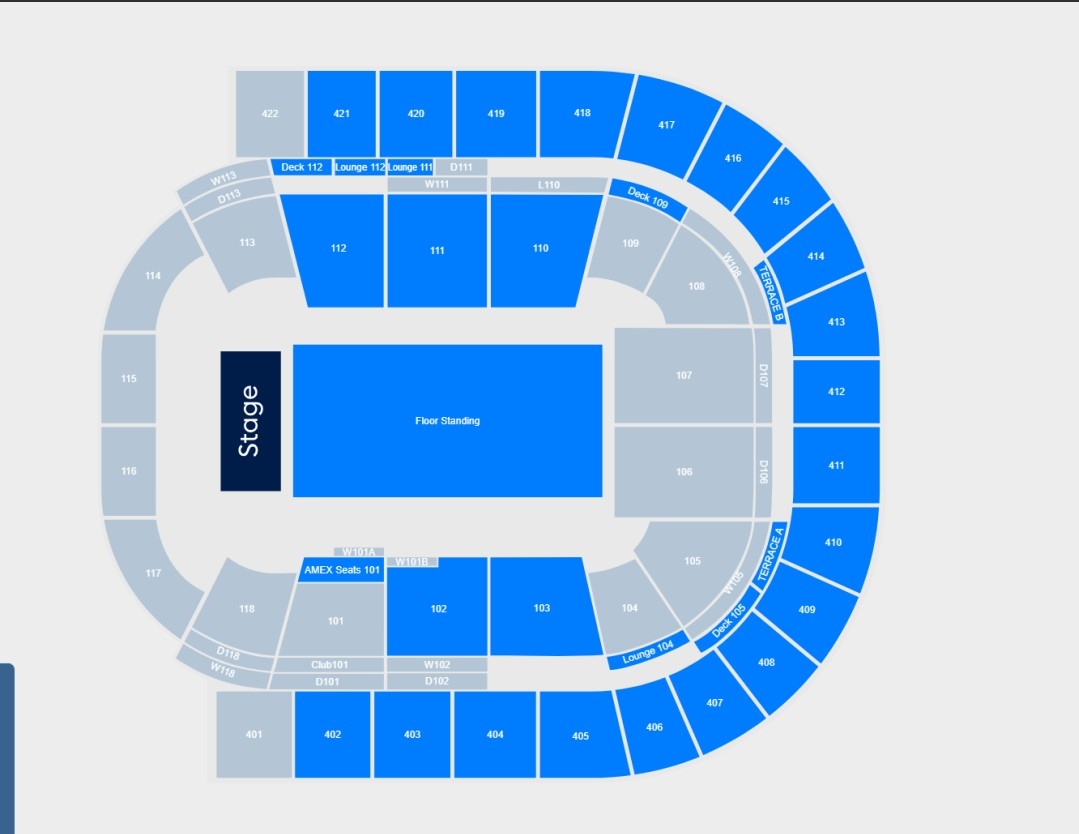
5) Once you have carted your desired tickets by our recommendations in the event guide, you are able to complete your purchase. Ensure you don’t go over the limit for the maximum quantity of tickets allowed per account and make sure to do each step as quickly as possible as there is a timer, usually around 10 mins.
6) Once you have checked out your tickets, they will appear in your account here: https://fanaccount.axs.com/myaxs/tickets/upcoming
2.3 Seetickets, Gigs and Tours & Eventim
We have combined these three guides together as they all release tickets in a similar manner. SeeTickets is owned by Eventim, and Gigs & Tours operates similarly to SeeTickets.
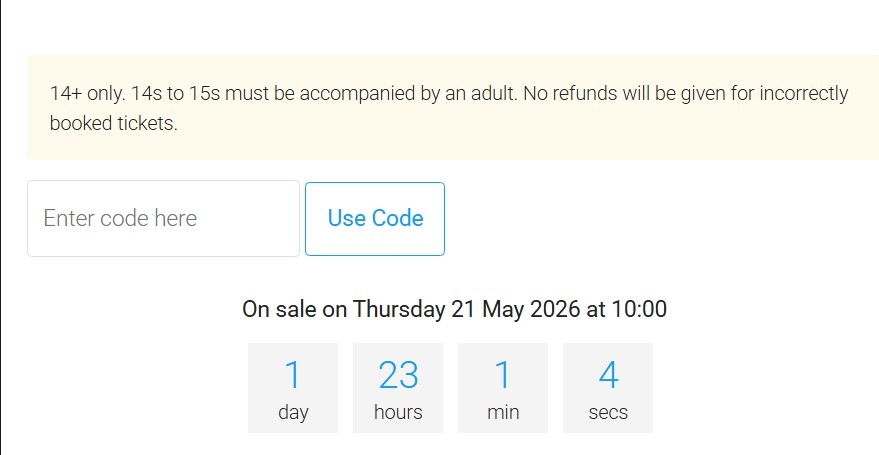
1) These sites drop tickets on a first come first serve basis. The event page will go live before the release time with a countdown timer to the drop date. Once the countdown timer reaches 0:00:00:00, refresh the page.
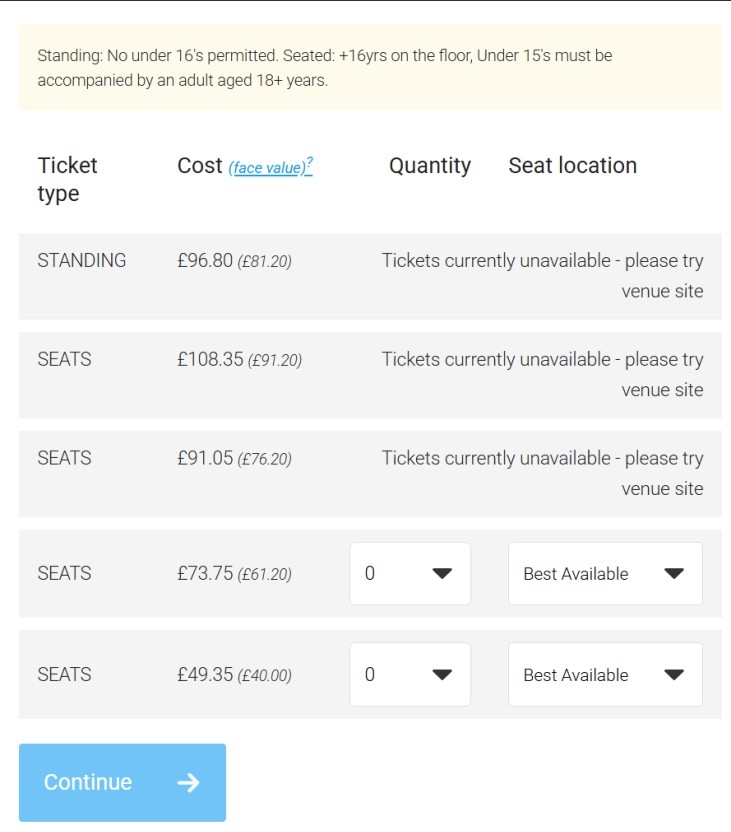
2) Once you have refreshed the page, the available tickets should be visible. Use the drop-down menu to select the number of tickets per section you want to cart. We recommend to only go for 1 section at a time. Once this is selected, click continue to proceed to payment. The ticket page will automatically limit you to the ticket limit per checkout so don’t worry about exceeding the limit. For these websites, ensure you are fast to have the best chances of getting tickets.
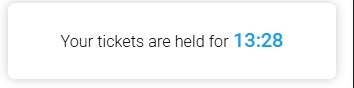
3) When purchasing tickets, SeeTickets provides a 14-minute cart hold for your tickets, so ensure you complete all details and purchase before this timer is up.
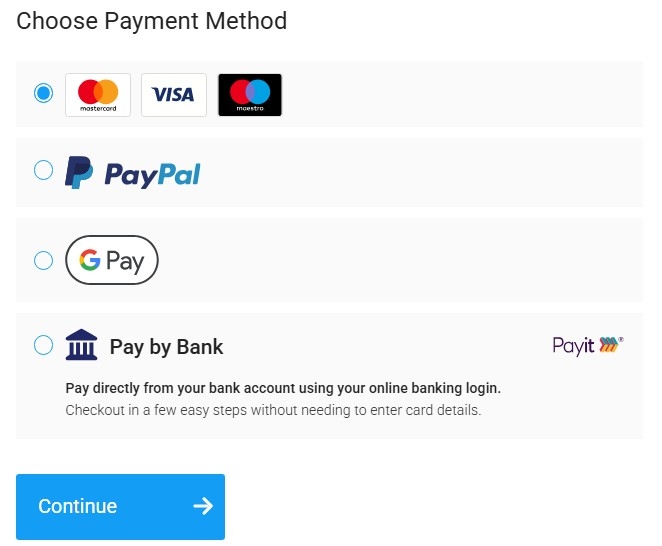
4) After this, simply add your desired payment method and proceed to checkout.
5) After purchasing, your tickets should appear in your account here:
https://www.seetickets.com/user/orders
2.4 Royal Albert Hall
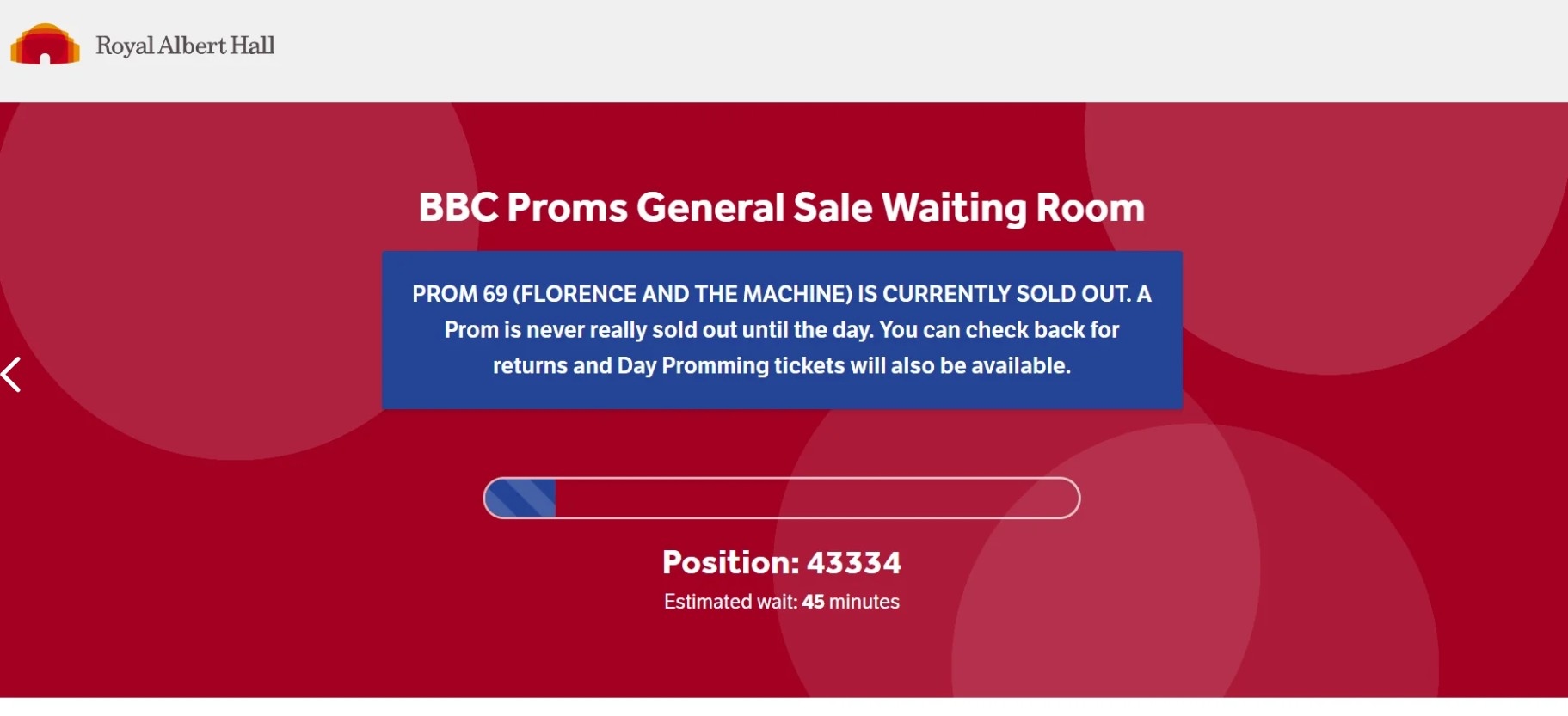
Royal Albert Hall uses CrowdHandler for its queue system. You can enter the queue on multiple chrome profiles, but don’t do too many on the same IP or you may be blocked.
1) Enter the waiting room when it’s live, links will be in the guide. Once you have entered, and when the queue goes live, you will be given a queue number which will determine your place in the queue.
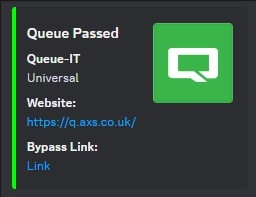
2) For Royal Albert Hall, the waiting room system can be bypassed. On these occasions, click the “Bypass Link” or “Share Pass” within the bypass channels e.g. axs-1 and axs-2. We will provide details for this on each release if we are able to provide bypasses.
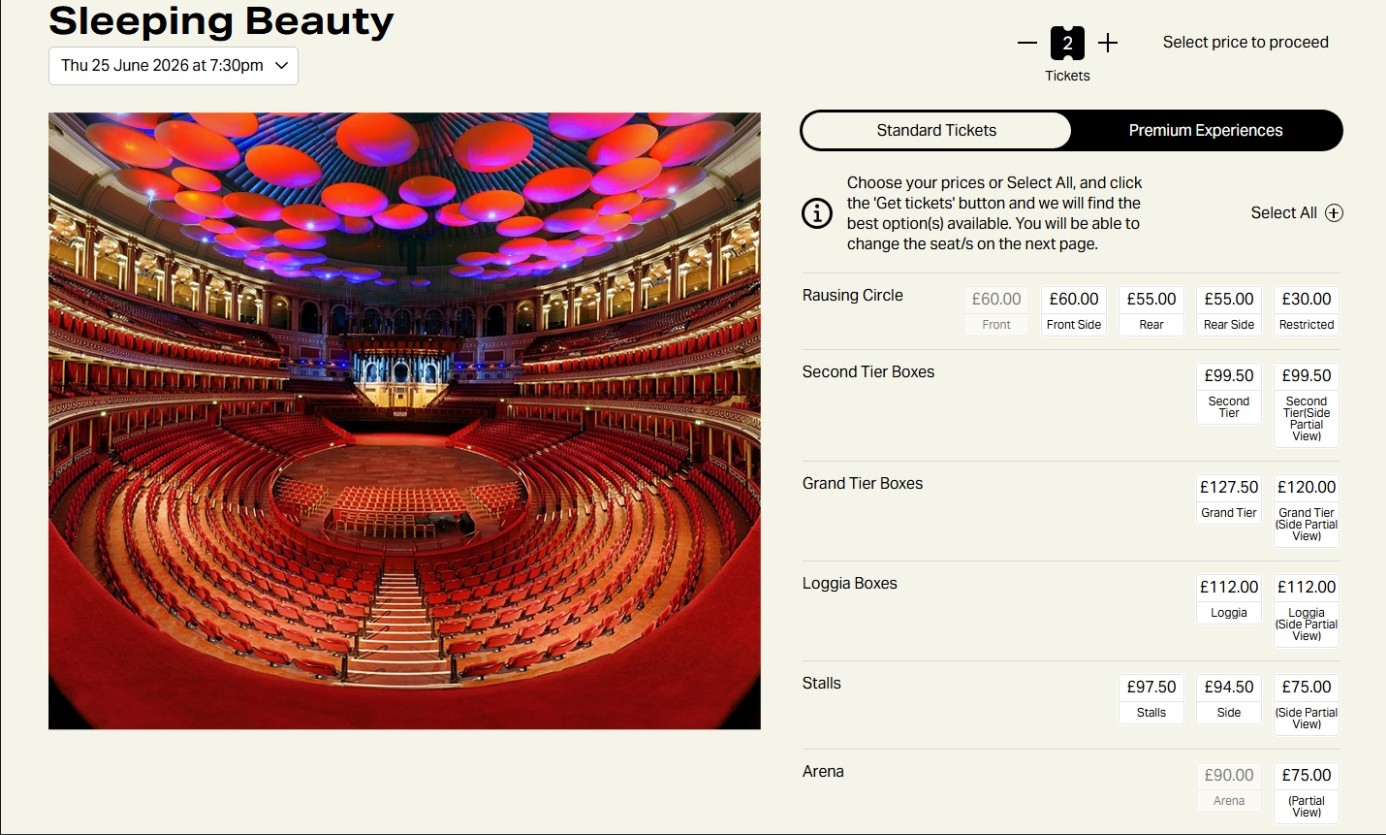
3) If the queue bypass is not being run, simply wait in the queue. You'll be automatically redirected to the purchase page when it's your turn. You’ll have the option to select the quantity and the tickets you would like.
4) Once you have carted tickets, you usually have roughly 30 minutes to fully check them out. Ensure that you complete each step as quickly as you can to avoid losing your tickets. The timer will be at the top.

5) If you can’t initially get any tickets, you may be able to catch a restock after people’s carts drop. This may happen around 30 mins into the drop.
6) Once you have checked out your tickets, they will appear in your account here:
https://tickets.royalalberthall.com/secure/account/pastorders
3. Selling Tickets
3.1 Considerations
When to sell
Ticket prices are typically highest early on, sometimes even before the general sale. We recommend listing your tickets on platforms such as Viagogo and StubHub as soon as you purchase them, as you can always adjust/lower your pricing later if needed.
Quantity for selling
When selling seated tickets, the safest option is usually pairs or quads, as this avoids being left with a single unsold seat. Altogether, pairs usually have the best demand out of any quantity. However, because most resellers list in quantities of 2, 4, or 6, groups of 3 or 5 are often rarer and can sometimes sell for a higher price.
For standing or general admission tickets, you can sell in any quantity because buyers are not tied to specific seats.
Always compare prices across marketplaces and quantities before listing to maximise your returns.
What price to list at?
Avoid undercutting the market - it is generally better to list at a higher price initially and reduce gradually if necessary. If you need to get sold quickly for any reason, just match the lowest ask, no need to undercut.
For high-demand events, it is usually best to price your tickets slightly above the lowest current listing so you can benefit if prices rise closer to the event.
You can always reduce your price later if the tickets are not selling, especially as the event date approaches.
When will I get paid?
Most marketplaces pay sellers 7-14 days after the event has taken place. Your payout will be sent to the payment method selected when listing your tickets, or the one in your account settings.
If you cannot be contacted close to the events and the buyer is unable to gain entry for any reason, you may lose your payout and be charged additional fees by the marketplace.
Where to sell?
There are multiple marketplaces in the UK to sell tickets including the following:
- Viagogo - Mainly used for selling in demand concert tickets at both small and large venues across the globe. Higher demand but lower sales price on this site. This is the marketplace we recommend for most events.
- StubHub – Mainly used for selling in demand concert tickets at both small and large venues across the globe. Often higher sales prices but lower demand on this site. Particularly good for sports tickets - Ticombo – Useful site for tickets that are not listed on Viagogo and StubHub - Twickets – Useful site for selling tickets back for retail if you can’t sell them for a profit elsewhere - Twitter – Used mainly for high demand events, or ones not listed on main marketplaces, such as charity events. Selling on Twitter also helps you get more profit, as you avoid marketplace fees
3.2 Ticket Calculator
The Ticket Calculator is a bot developed privately for House of Resell to help you determine the price you want to list at, on UK reselling sites - Viagogo and StubHub. These sites have both a listing price (what you put when you are listing) and a display price (the price the buyer sees on the event page). To calculate what listing price appears at what display price, you can use the Ticket Calculator bot located in the 🧮┇ticket-calculator channel of the Ticket Hub in the House Of Resell Discord.
Guide
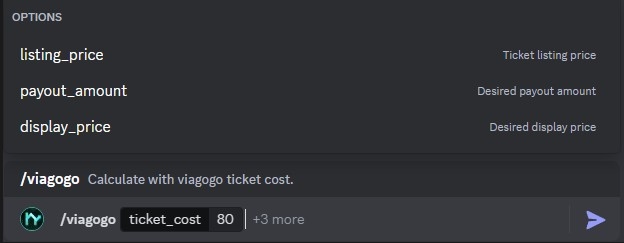
1) Start the command with a “/” and then choose which site you are selling on. The command will be as follows so select the one associated with your marketplace.
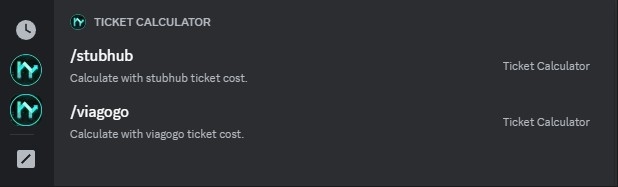
2) You will now be prompted to enter the ticket cost. This is the price after fees per ticket. If this is not shown directly, divide your total purchase price by the amount of tickets you purchased. For this example we have set it as £80.

3) You will now be prompted to select the following based on what information you want to find out. For this example we are going to use the display_price to find out what the listing_price and the payout amount is.
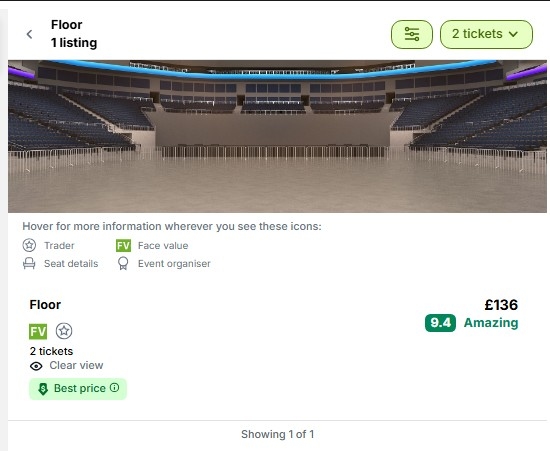
4) For this event the floor display price, as shown below, is £136 on viagogo.co.uk so we will set it at this price to calculate what the required listing price.

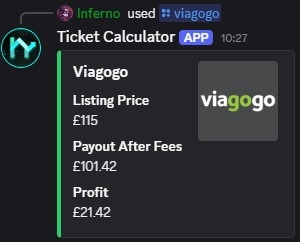
5) You can now send the command. The bot returns the response shown below. This provides the listing price (£115) required for your tickets to display at £136 on the website. It also shows you your payout per ticket (£101.42) and your profit per ticket (£21.42).
3.3 Delivery Methods
How do I Identify what my ticket type is?
Throughout the checkout procedure, you'll receive clear indications of whether your ticket falls under the category of an electronic ticket (E-Ticket), mobile ticket, or physical ticket (also known as paper tickets). Additionally, your email confirmation will typically specify the type of ticket you've purchased.
Event ticket vendors, such as Ticketmaster, also show information about event restrictions on their event pages. Simply click on the “more info” button on the event page to access these details.
If any special measures necessitate the involvement of a "lead booker" or require account surrender, we will include this information in our guides.
Mobile Transfer & Mobile Tickets
Mobile transfer is when a ticket can be transferred directly via a website or an app. If the tickets are mobile transfer through Ticketmaster / AXS you usually require their name and email. A transfer button will show on the event page on the app / website if available for that event. If the app / website displays "transfer unavailable" it typically means that it will be available closer to the event.
Mobile tickets are dynamic QR codes found in the vendor's app (e.g., Ticketmaster). They are easy to distribute if the transfer feature is enabled, allowing you to send them to the buyer's name and email (provided by marketplaces like Viagogo/StubHub). Mobile tickets are the most common type of ticket.
E-tickets
E-tickets are when you are provided a PDF which can either be downloaded from the website you purchased the tickets from or via an email you are sent. If the tickets are sent as a PDF, you can send to buyers or upload to platforms directly. If the tickets are not a pdf and are either a QR code in an app, you will need to use an online converter such as https://www.freepdfconvert.com/jpg-to-pdf. After converting you will then be able to upload the file to Viagogo or other sales platforms.
Please note that If the QR code is in an app and the barcode itself does not change with time, you are able to screenshot. However, if the barcode changes/rotates, you will not be able to send a screenshot and you will either have to deliver the tickets via mobile transfer or account surrender.
Marketplaces
Unless you have a private buyer lined up, you will need to list your tickets on a marketplace. The two that we recommend (for EU and UK shows) are Viagogo and StubHub. Viagogo should be your first choice simply because it is more popular and has more volume. StubHub is the alternative when you want to list your tickets asap and when Viagogo has not listed the event yet. We don’t recommend you list on both websites for the same tickets or seats. For example, if you’re asleep and both happen to sell overnight, you won’t be able to fulfill both orders and may be charged fees for a cancellation.
3.4 Viagogo
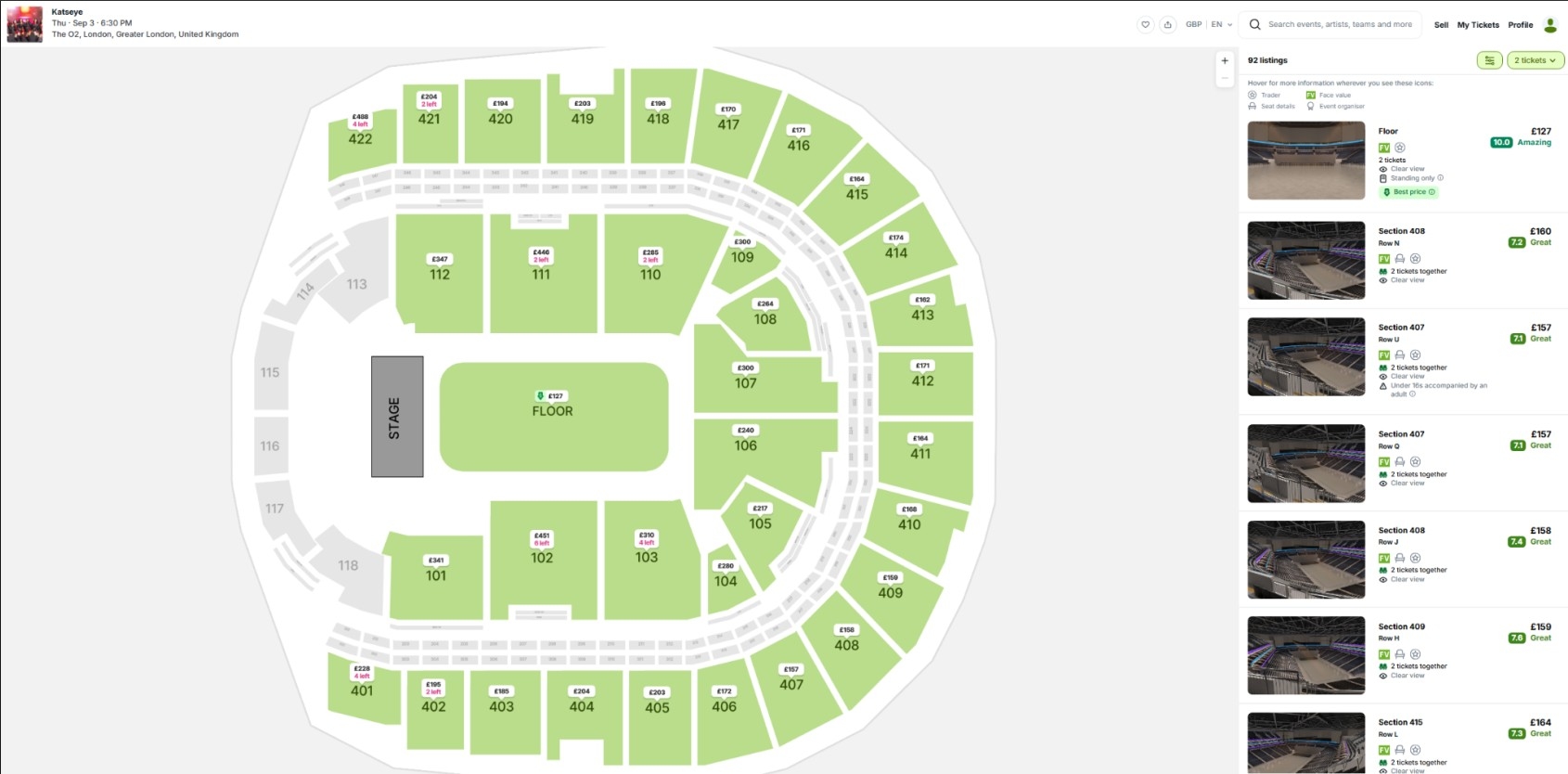
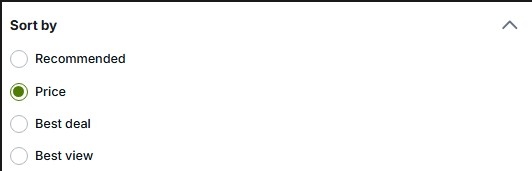
1) After you have bought tickets, you can search for the event. After going onto the event page, you should filter by the section you have. If you have standing, cheap uppers or cheap lowers, just filter by the overall section. If you have prime tickets (e.g. lower tier tickets near the stage), then check just the block and the nearby blocks to gauge the price. Make sure you filter by the correct quantity and ensure you have the sort by price (see below)
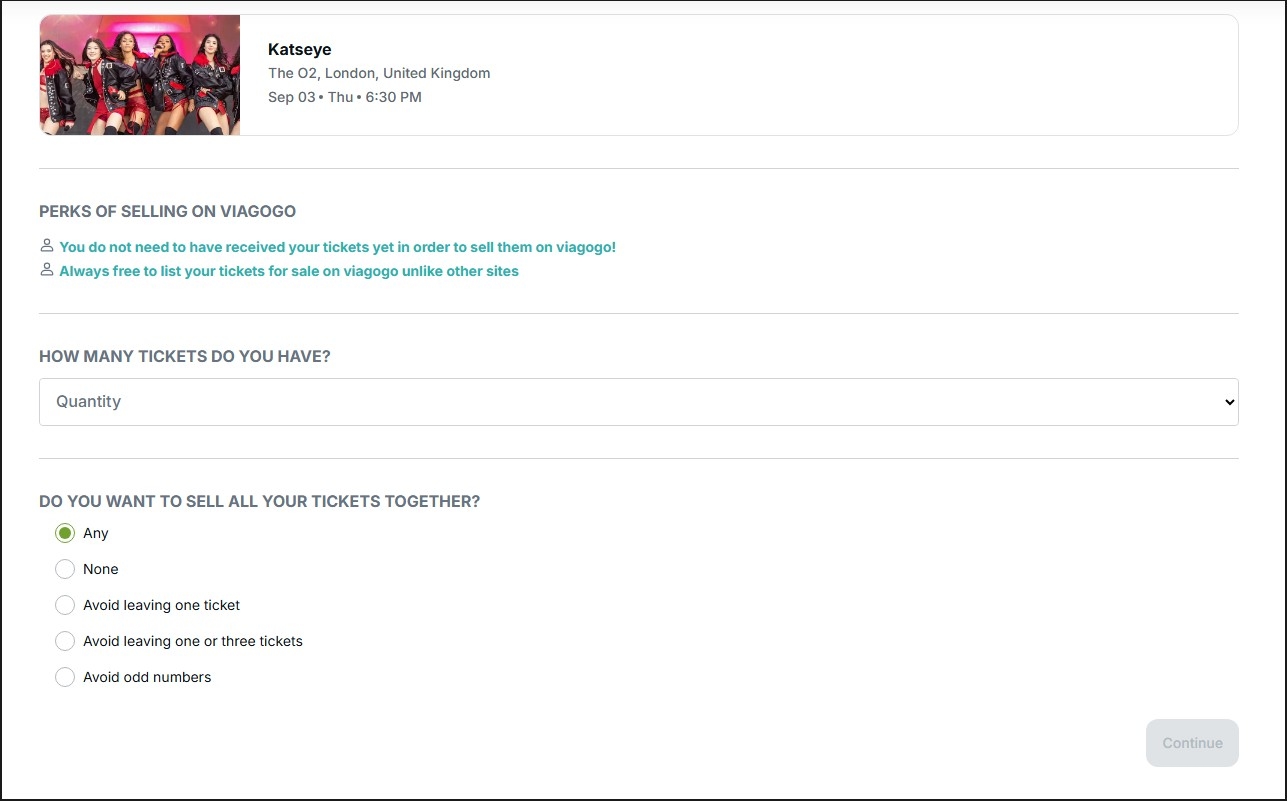
2) After you know what price you will list for, click the “Sell” button at the top-right of the page. This will take you to where you need to provide details to list your tickets. Below is the first page of this, where you have to state the quantity of your tickets and how you want to sell your tickets:
- Any - This means you can sell your tickets with any quantity
- None - This means that you can ONLY sell your tickets for the maximum amount, so if you have 3 tickets and select this, your tickets can only sell as a 3, not a 1 or 2.
- Avoid leaving one ticket - Self-explanatory
- Avoid leaving one or three tickets - Self-explanatory
- Avoid odd numbers - This means you can only sell your tickets in 2s, 4s, 6s etc.
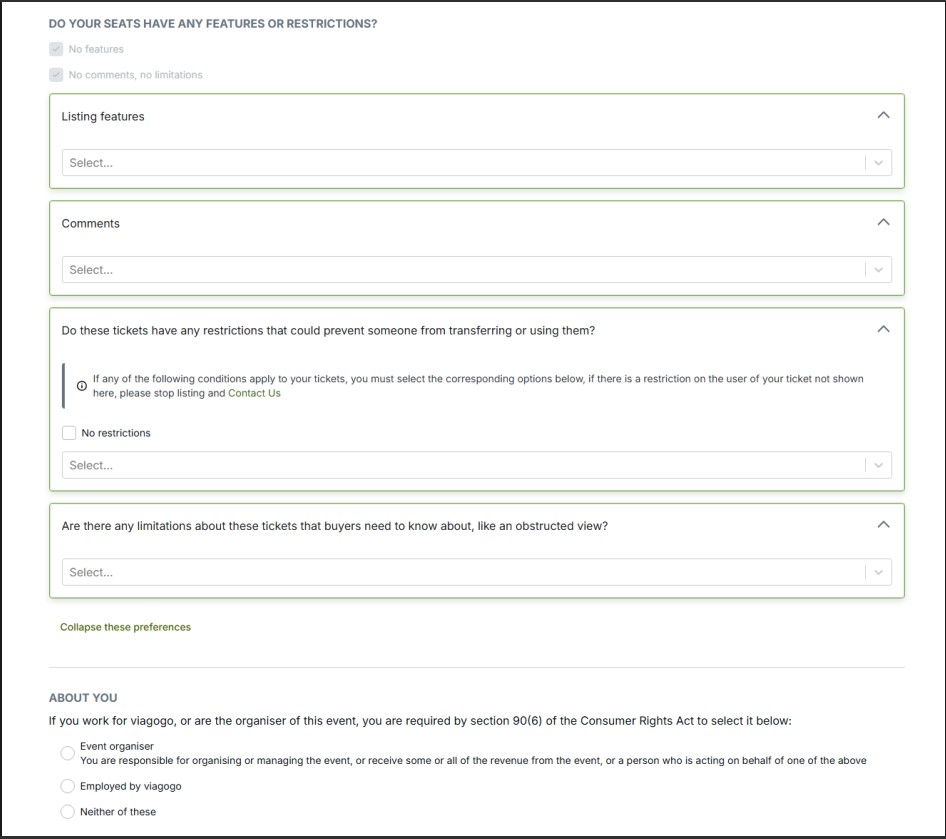
3) You’ll then have to put in details about listing features, comments, restrictions and limitations. Usually you’ll only have to fill out the restrictions part to do with age restrictions or standing. The time where you have to fill out limitations as well, is when you have a restricted or side-view ticket. For the bottom section ‘ABOUT YOU’, just select the bottom option.
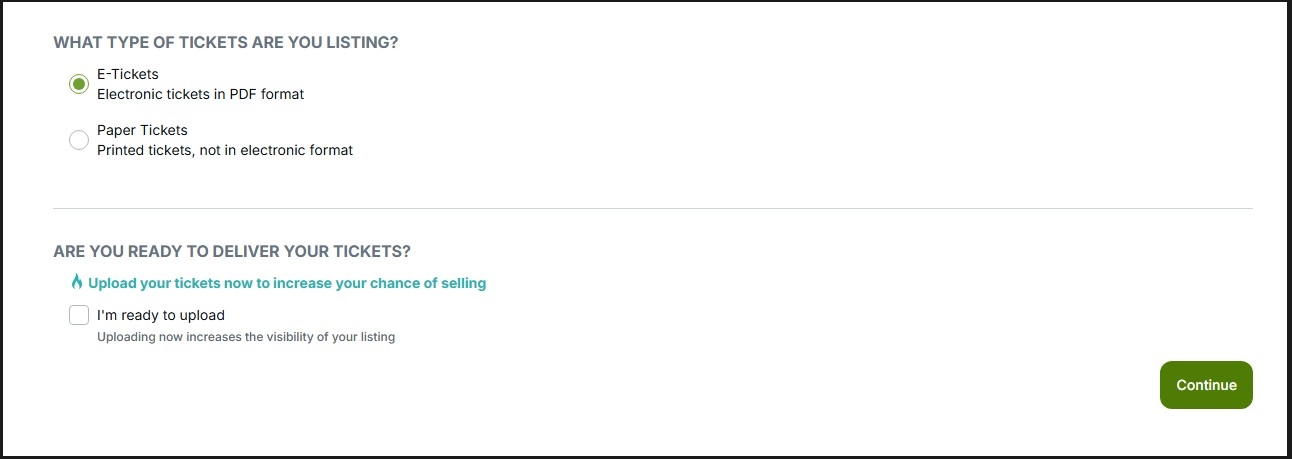
4) You will then have the option to select between E-Tickets and Paper Tickets, 99% of the time you want to select E-Tickets. Then uncheck the next box unless you are ready to upload them. You’ll be able to change the delivery method later on such as ‘Mobile Ticket Transfer’.
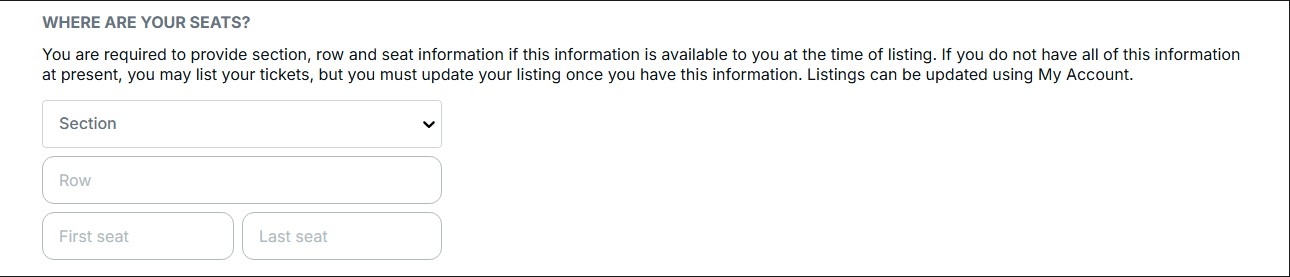
5) Easy step, just input the information about where your tickets are located.
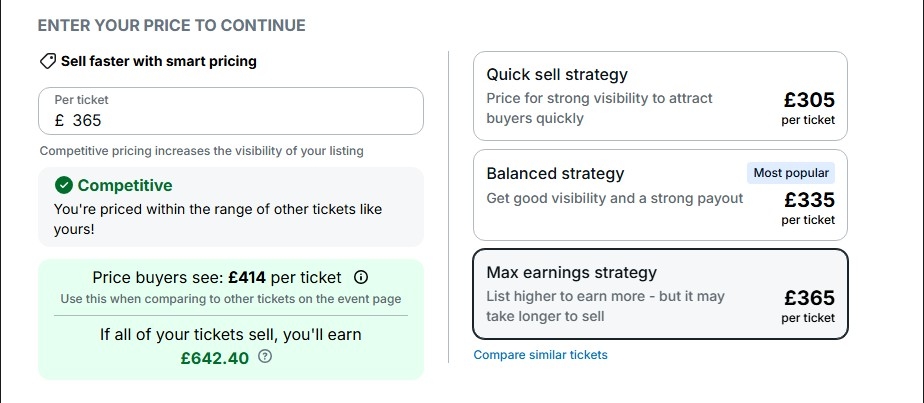
6) Now enter the price you’d like to sell your tickets at from before. Please note that the prices they give you as options may not be too good or accurate.
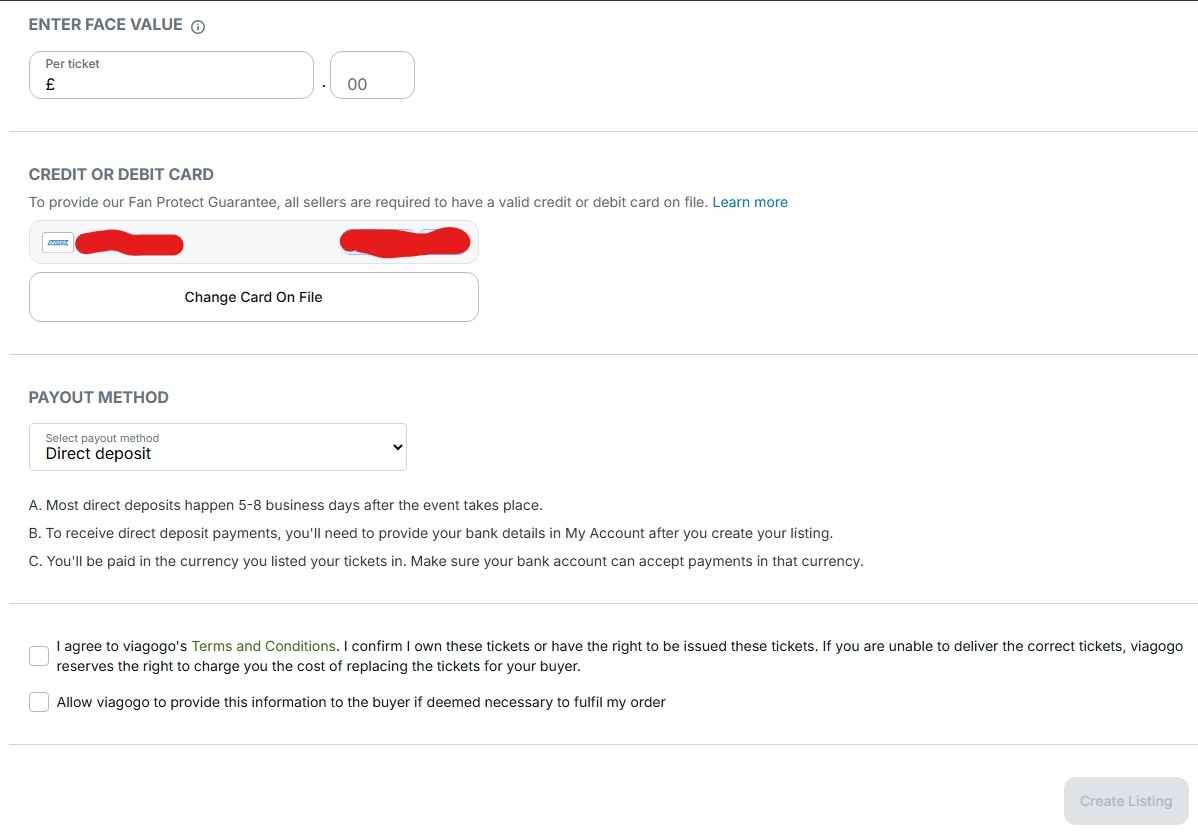
7) Now enter the face value for your tickets, this will be in your email, and it’s the price per ticket before fees. Then select your Credit/Debit Card, your payout method, and agree to both terms. After this, you can click “Submit” and list your tickets!
3.5 StubHub
1) After you have bought tickets, you can search for the event. After going onto the event page, you should filter by the section you have. If you have standing, cheap uppers or cheap lowers, just filter by the overall section. If you have prime tickets (e.g. lower tier tickets near the stage), then check just the block and the nearby blocks to gauge the price. Make sure you filter by the correct quantity.
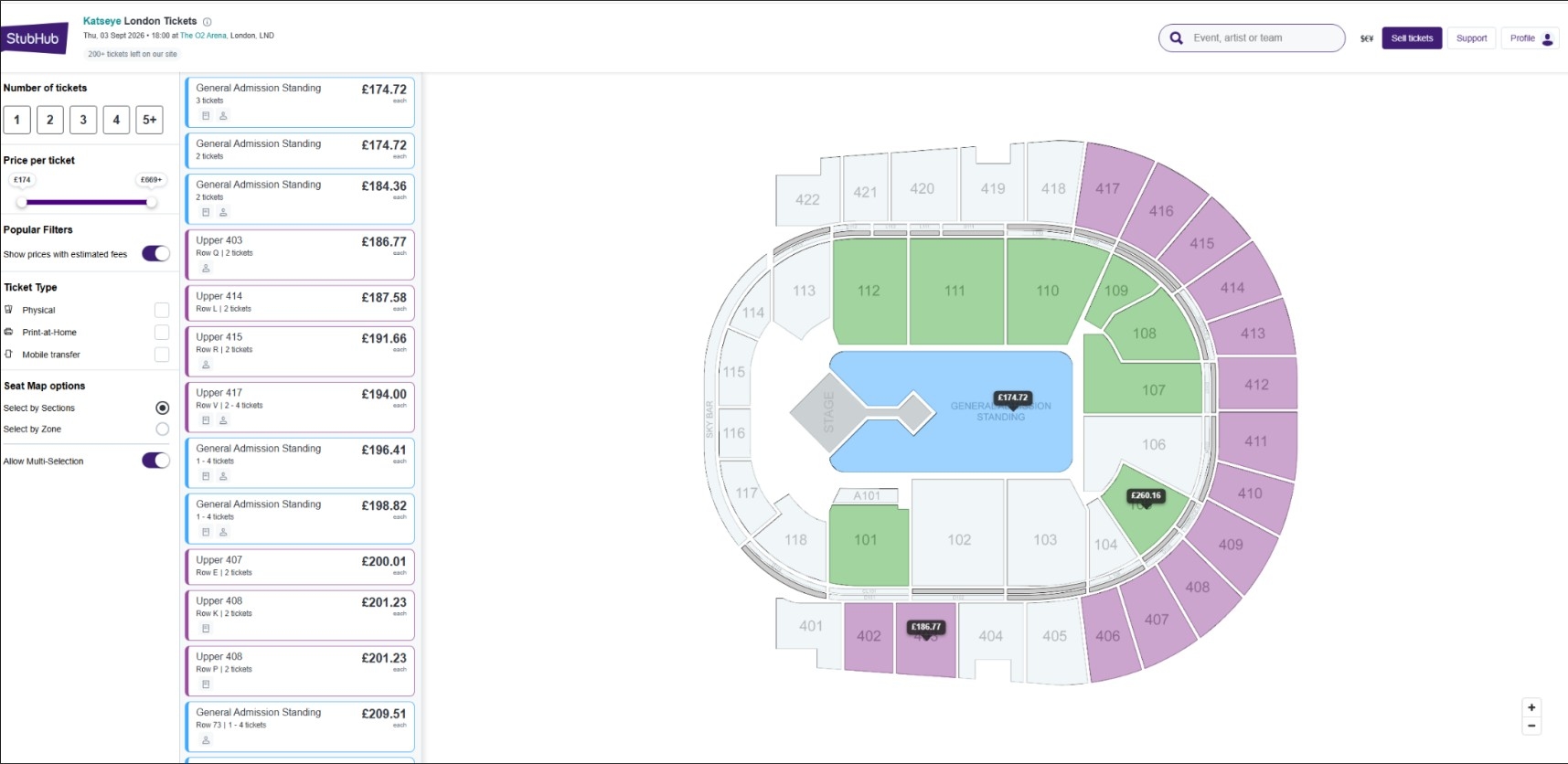
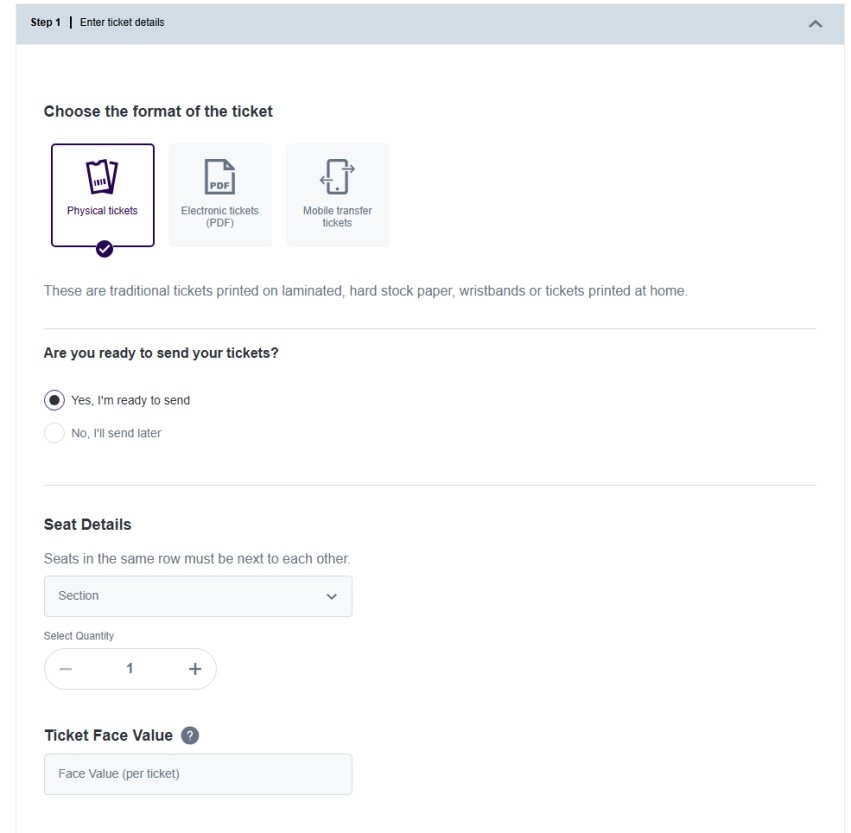
2) After you know what price you will list for, click the “Sell tickets” button at the top-right of the page. This will take you to where you need to provide details to list your tickets. Below is the first page of this, where you have to choose the format of your tickets (usually you will choose Mobile transfer tickets), whether you can send your tickets (usually it’ll be no), the seat details, quantity and face value. Note that face value is the amount per ticket, before fees, which you can usually find in your order confirmation email.
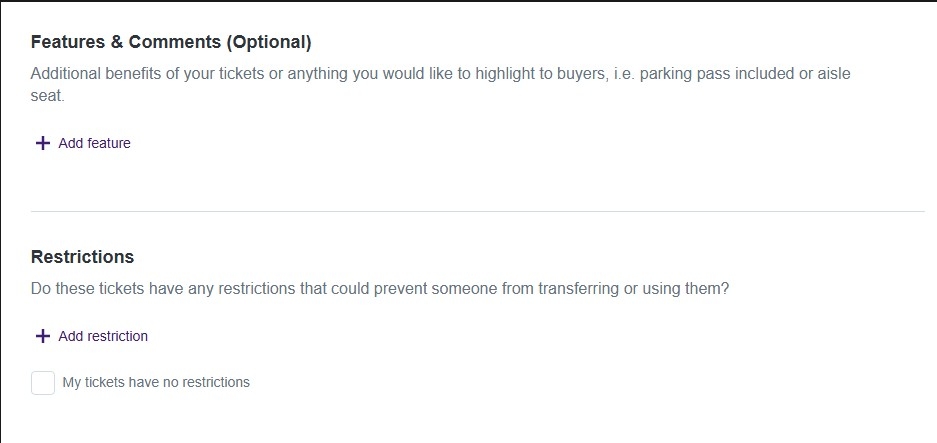
3) You’ll then have to put in details about listing features, comments, restrictions and limitations. Usually you’ll only have to fill out the restrictions part to do with age restrictions or standing. The time where you have to fill out limitations as well, is when you have a restricted or side-view ticket.
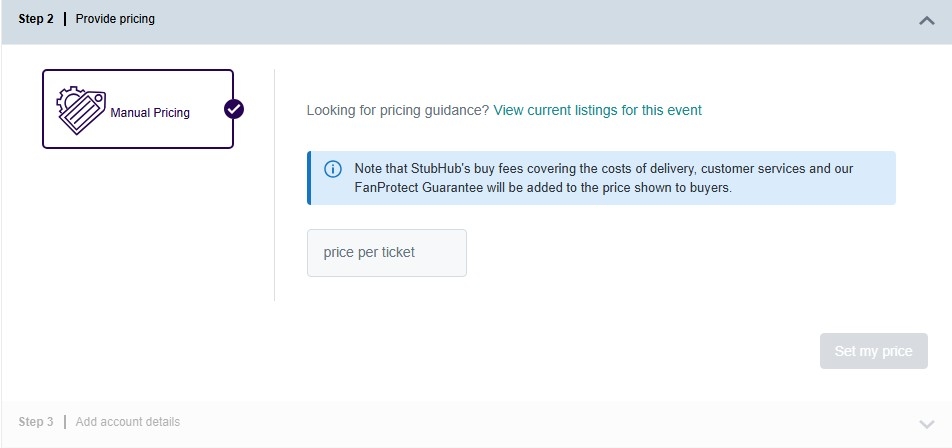
4) You will then have to select the price per ticket for your tickets. Use what you figured out in step 1. After inputting, click “Set my price”.
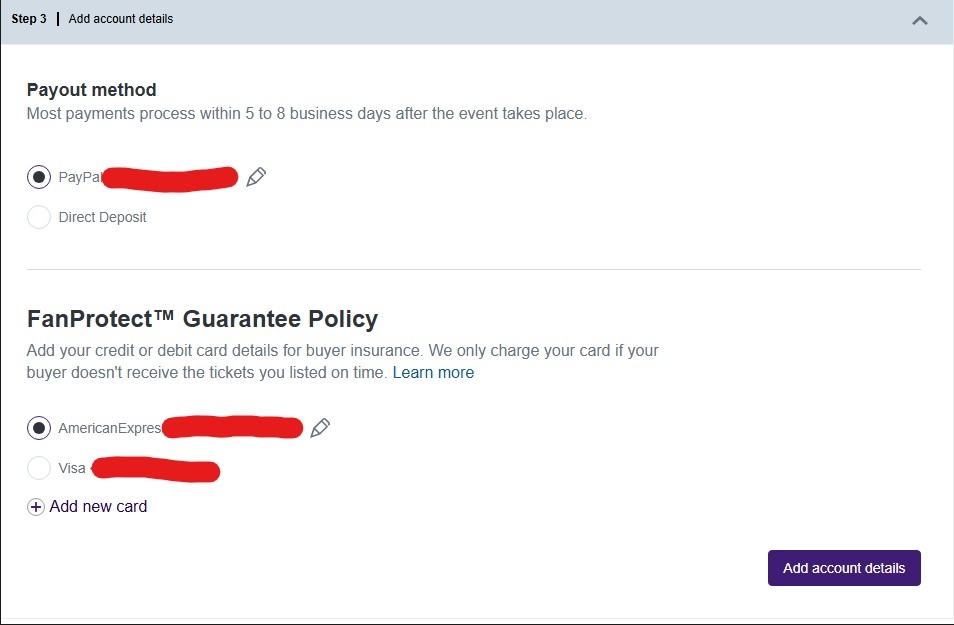
5) Add your account details for the payout method and credit/debit card. Click “Add account details” when done.
6) Click “List my tickets” to finalise the listing!

3.6 Ticombo
Ticombo is an online ticket marketplace where fans can buy and sell tickets for concerts, sports events, festivals, and other live experiences. The platform operates as a fan-to-fan resale marketplace, connecting buyers and sellers directly while offering payment protection and ticket verification features. It’s an alternative to Viagogo and StubHub, and used if the event is listed here but not on other platforms.
1) After you have bought tickets, you can search for the event on the website. After going onto the event page, you should filter by the section you have. If you have standing, cheap uppers, or cheap lowers, just filter by the overall section. If you have specific good or prime tickets (e.g. lower tier tickets near the stage), then check just the block and the nearby blocks to gauge the price. Make sure you filter by the correct quantity.
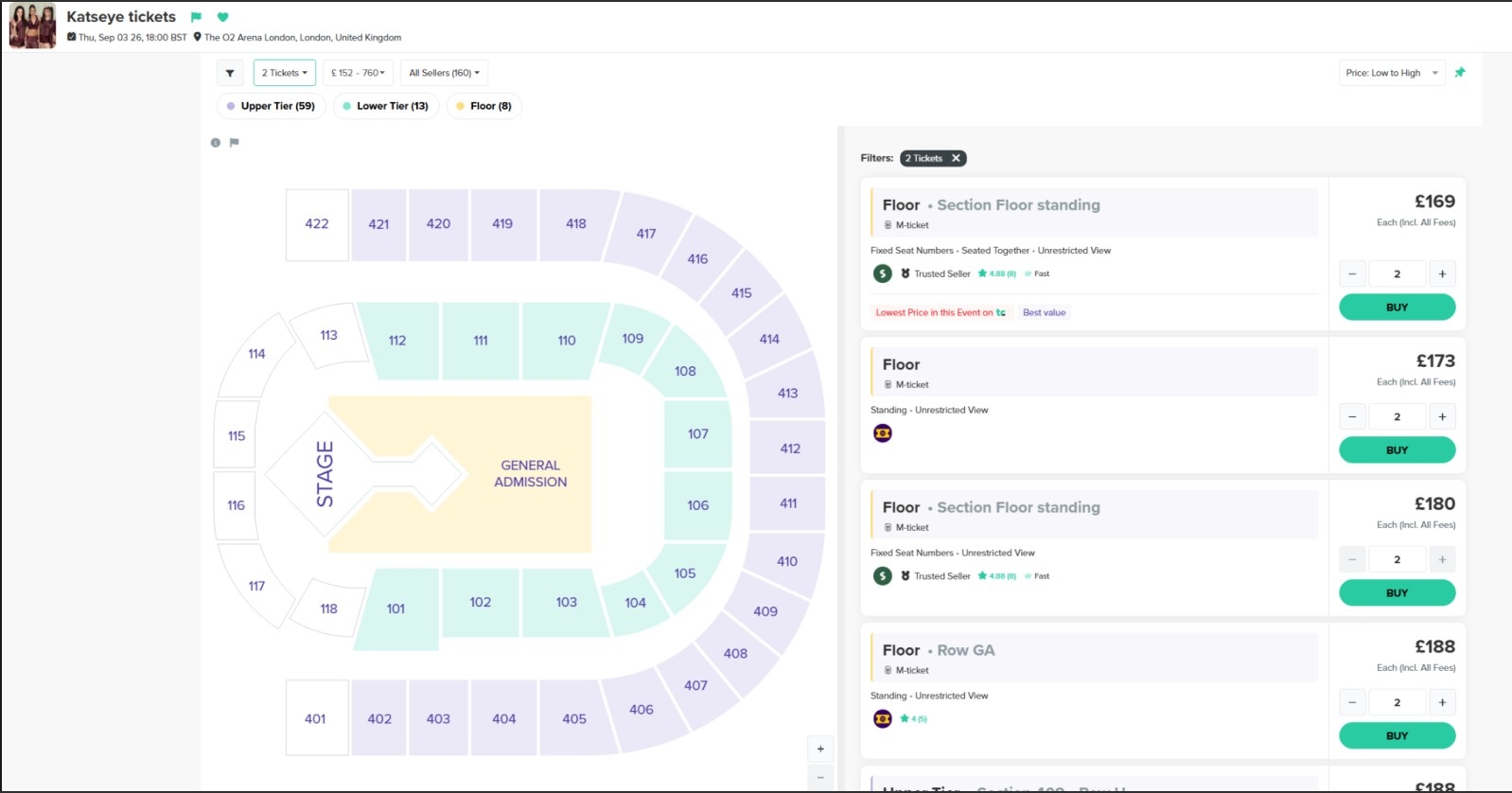
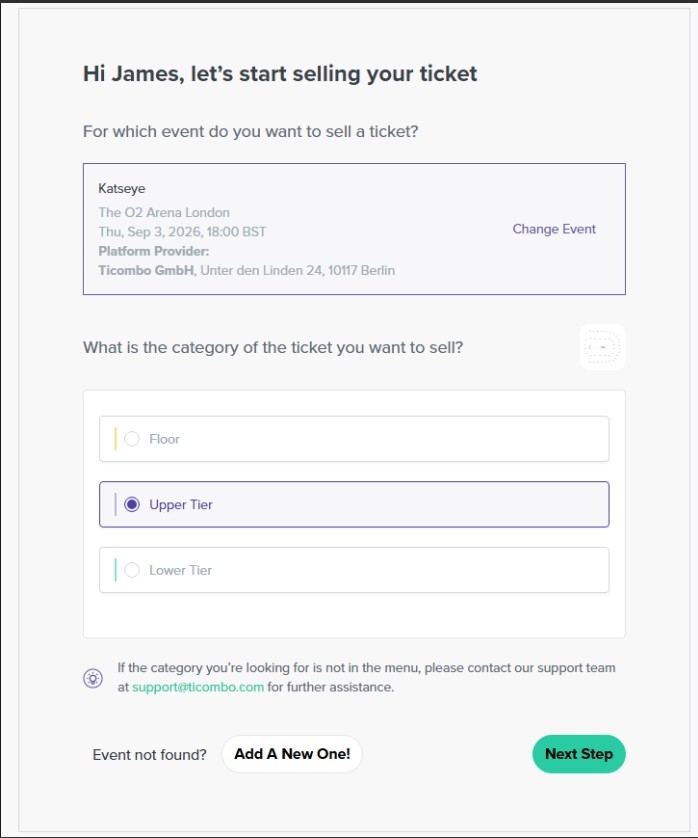
2) After you know what price you will list for, click “Sell your tickets” at the top right, you’ll then have to search for an event, select the category/section of tickets, and then click “Next step”
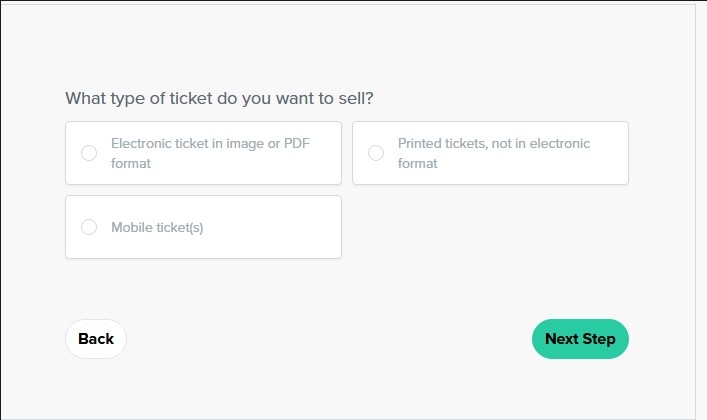
3) You then have to select the type of ticket you’d like to sell, this will usually be Mobile ticket(s).
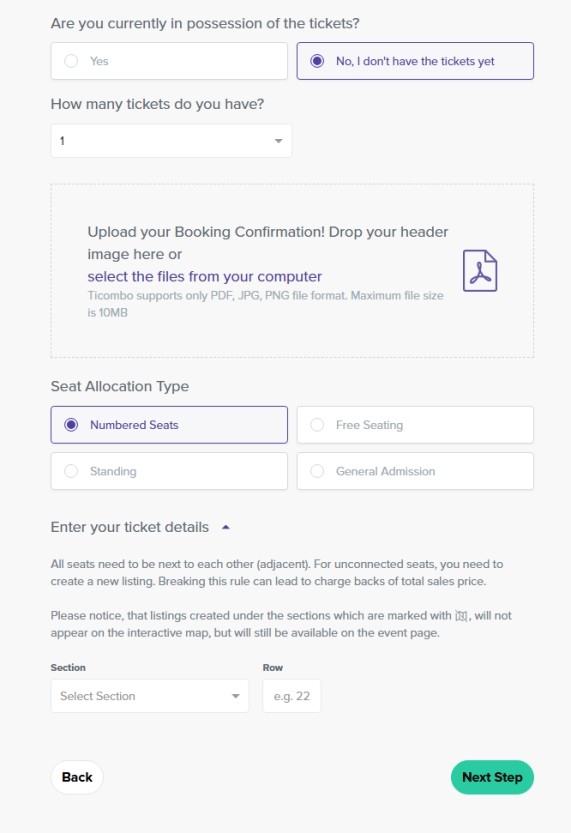
4) You then have to fill out some additional details about the tickets which are all self explanatory. For the Seat Allocation Type, select Numbered Seats if you have seats, and Standing if you have standing. Note that you have to upload your booking confirmation, so just screenshot or download the order confirmation email you have received.
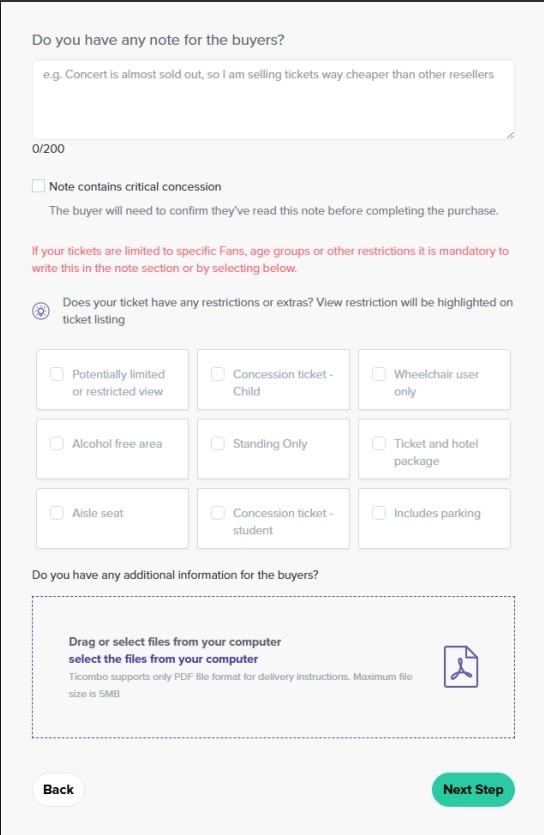
5) The next step is where you add comments or restrictions about the tickets, such as if they are side or limited view.
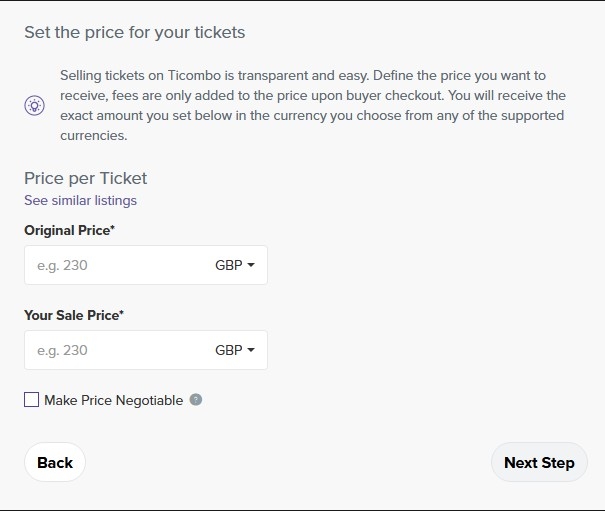
6) Now enter the price you’d like to sell your tickets at that you worked out in step 1. On Ticombo, you can choose to make the price negotiable, meaning people can put offers on your sale. You can turn this on but you may get lowballed a lot.
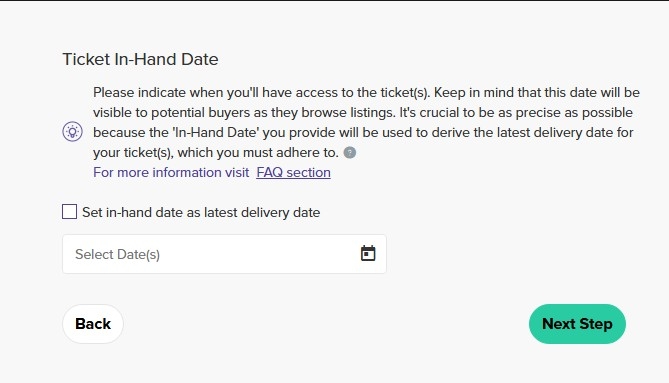
7) If you don’t have the tickets ready yet, it’ll ask you when you will have them. Here, you should check the box that says “Set in-hand date as latest delivery date”
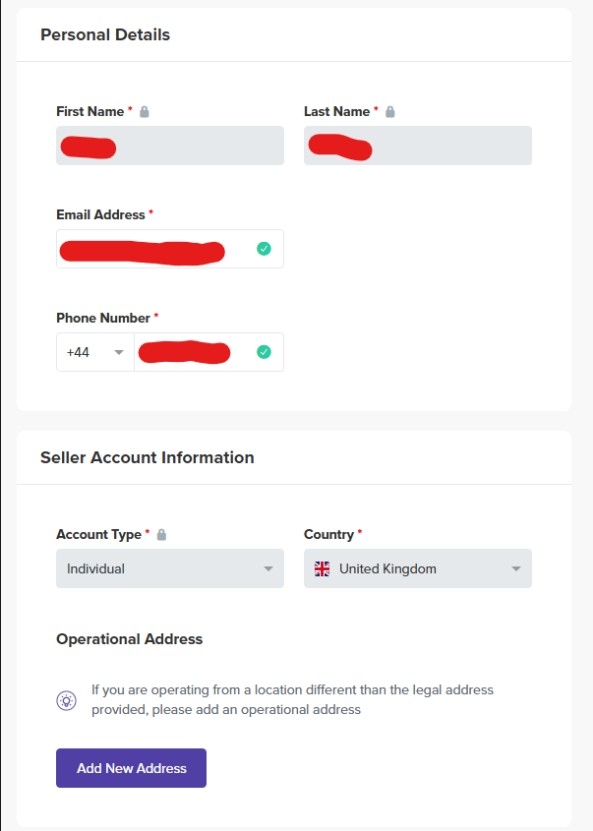
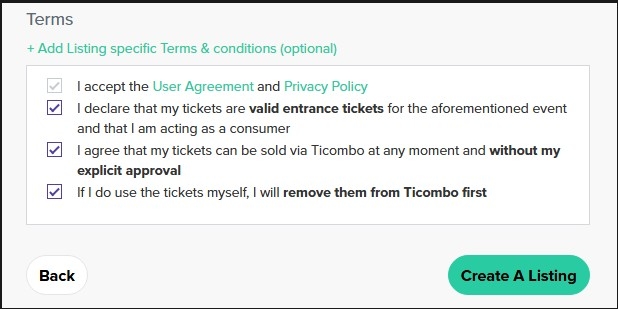
8) You then have to enter your personal details and agree to their terms and conditions. After that, hit “Create A Listing”, and your tickets will be listed! Note that they have to review your proof of purchase first, that you previously uploaded.
3.7 Twickets
Twickets is an online ticket marketplace where fans can buy and sell tickets for concerts, sports events, festivals, theatre shows, and other live experiences. The platform operates as a fan-to-fan resale marketplace, connecting buyers and sellers directly while promoting fair ticket resale. Unlike many other resale platforms, Twickets only allows tickets to be sold at face value or less.
1) If you are struggling to sell tickets for above retail price, Twickets is a great place to sell them. First go to the website and hit “Sell tickets” at the top right of the page.

2) You then have to search for the event and then select it. It’ll then ask you some details about your tickets. For the ticket type, most of the time it’ll be “Mobile ticket”. You then have to select where you bought from, and whether they are ready to transfer. If they aren’t ready to transfer, just put the latest date available. Then put the quantity of your tickets and click “Yes” for the next question if they are all the same type of ticket. Then select your ticket type e.g. Standing.
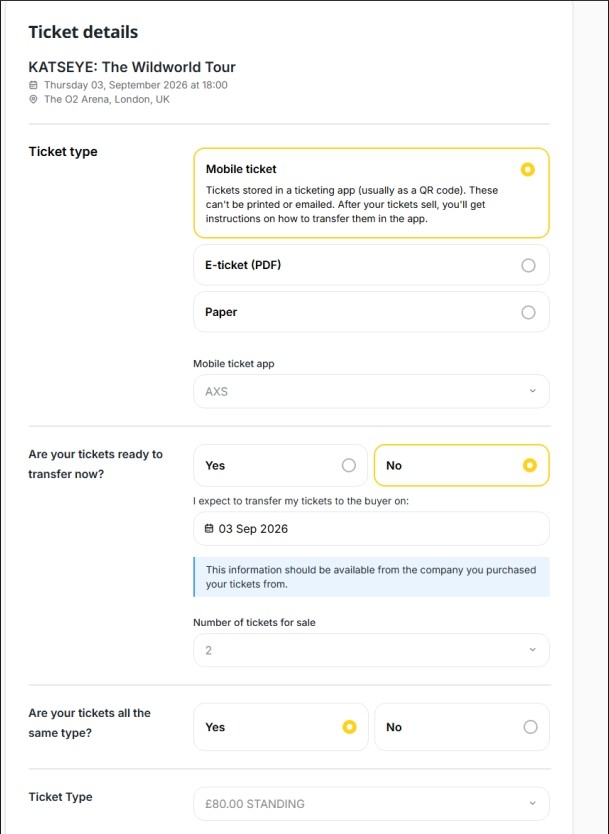
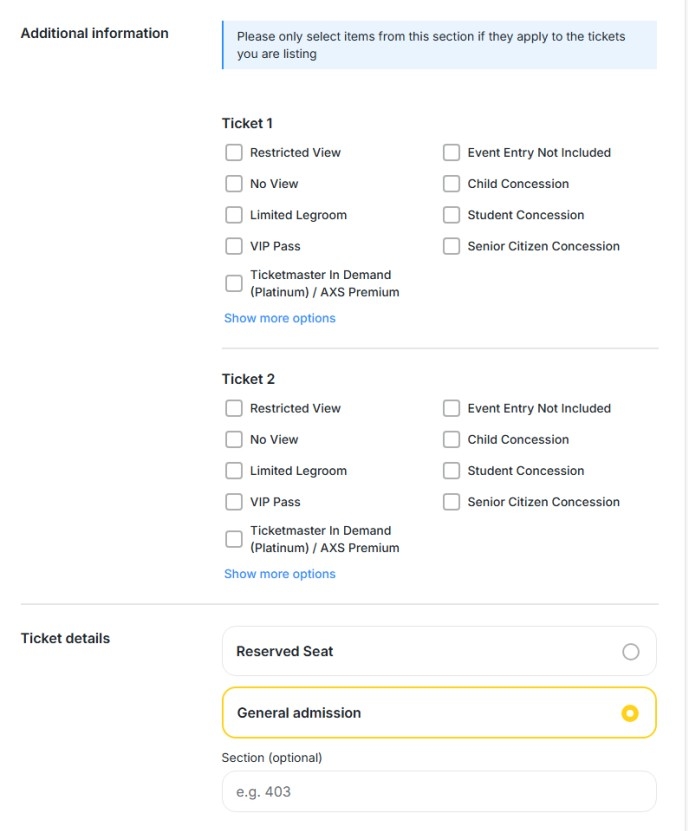
3) It’ll then ask you about restrictions & limitations, select anything that applies to the ticket you bought e.g. restricted view. For the Ticket details section, select Reserved Seat if you have seated tickets, and General admission if you have standing or sections without specific seats/allocations.
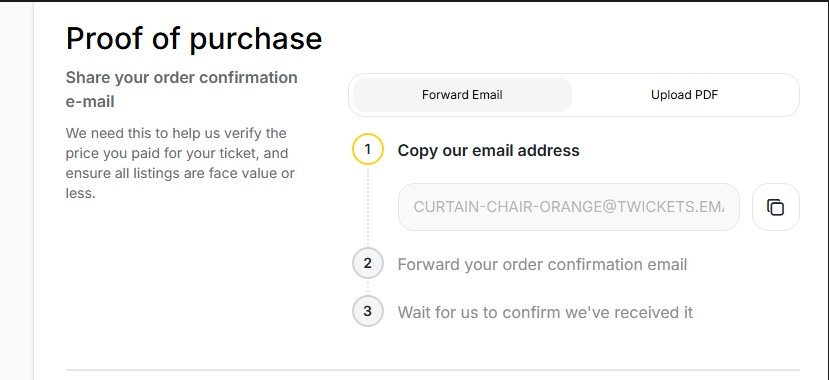
4) On Twickets, you have to upload your proof of purchase, so either send it to the email they give you, or upload it directly onto the website. This will be your order confirmation email.
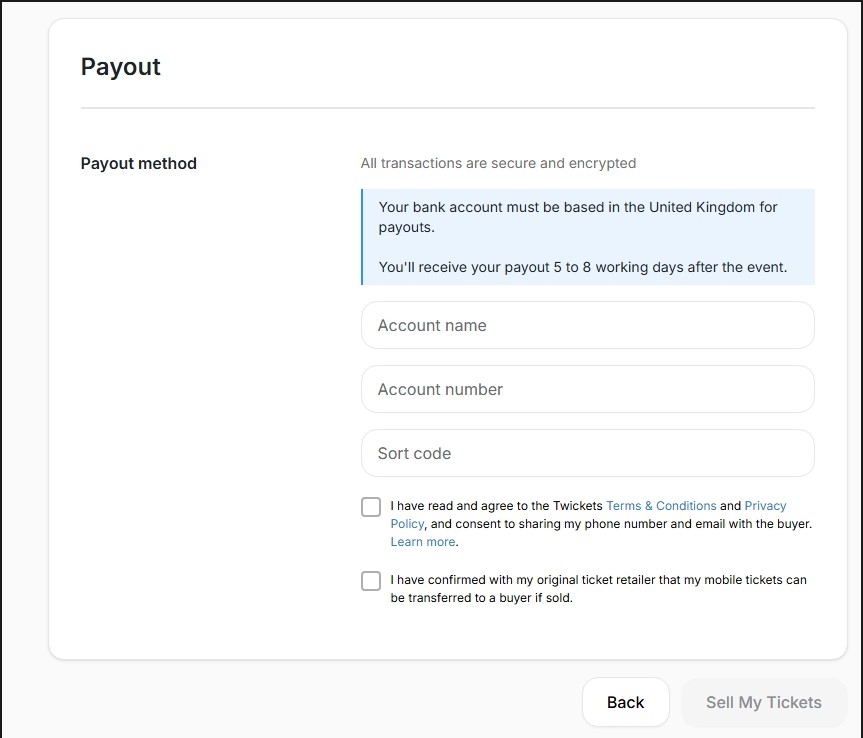
5) The last step is to add your Payout method and agree to the Terms & Conditions, you can then click “Sell My Tickets” to list them.
3.8 Twitter
Twitter can be an effective marketplace for selling tickets, thanks to its instant payout and avoidance of marketplace fees. Demand is often strongest immediately after ticket releases, as conversations and complaints about the sale trend across the platform, and push ticket-related posts into the algorithm.
Events that tend to perform best on Twitter are those with high demand, targeted at younger audiences, particularly smaller venue events across the UK. Sporting events also tend to sell well due to high engagement and time-sensitive demand.
Payments
When receiving payment on Twitter always use bank transfer or PayPal friends and family. PayPal Goods and Services guarantee doesn’t include digital items such as tickets!
Things to include in your tweet:
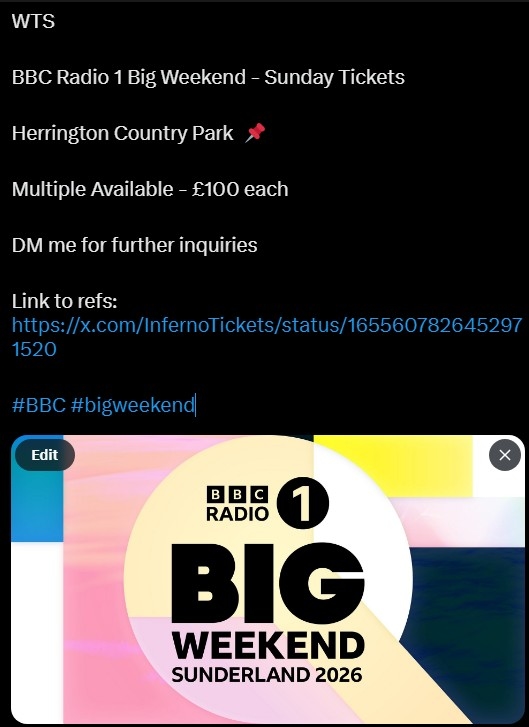
- WTS Event Name, Date and Venue - How you would like them to contact you - DM / Comment on post - Link to your reviews – make sure you have a reviews post pinned to the top of your profile where previous buyers can vouch for you - Hashtags related to the event (optional but helps get your post get more views) - Picture of the artist/tour poster added to the bottom of the post.
Example Tweet
3.9 Selling back to AXS and Ticketmaster
3.9.1 Ticketmaster
1) Go to this link to see your orders - https://www.ticketmaster.co.uk/user/orders - Pick the event for the tickets that you’d like to sell back to Ticketmaster. Note that not all events may allow for selling, or they might not be open for selling at that current time/date.
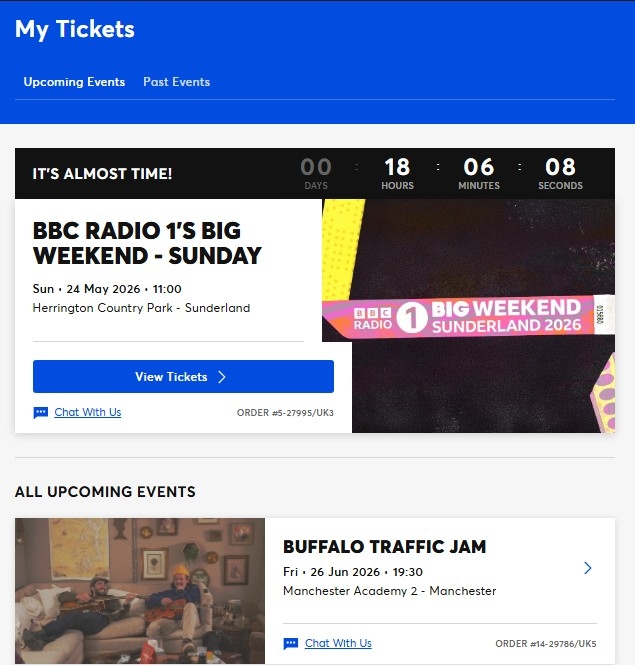
2) Click on “Sell” to begin the listing process:
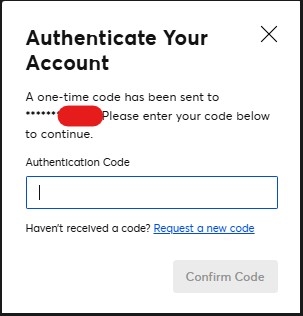
3) You may now have to enter a one-time code which will automatically be sent to the phone number linked to your account.
4) Now select the tickets you want to sell and the price you want to sell for (per ticket). Note that this price can’t exceed the face value of the ticket, if you want to sell over face value, you’ll need to use platforms such as Viagogo or StubHub.
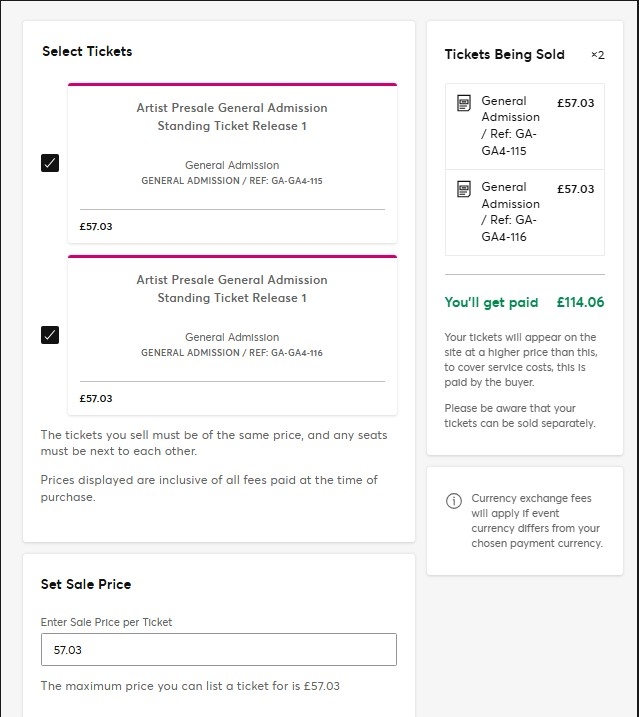
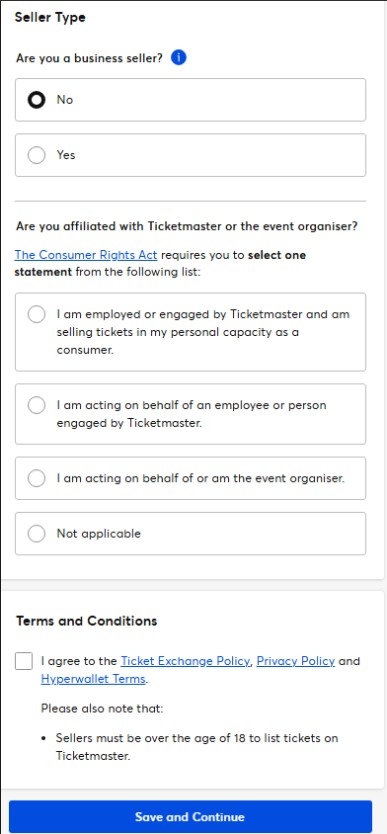
5) For Seller Type it will ask you if you are a business seller, select “No”. Also click “Not applicable” for your association with the event organiser. Accept the terms and conditions and the bottom of the page and then click “Save and Continue”.
6) It’ll then ask for your Seller Details and Payment Info, fill all of this out accurately. You’ll then be able to list your tickets!
3.9.2 AXS
1) Go to this link to see your orders - https://fanaccount.axs.com/myaxs/tickets/upcoming - Pick the event for the tickets that you’d like to sell back to AXS and click “Sell”. Note that not all events may allow for selling, or they might not be open for selling at that current time/date.

2) You will then have to select which tickets you’d like to list, select all that you want to sell.
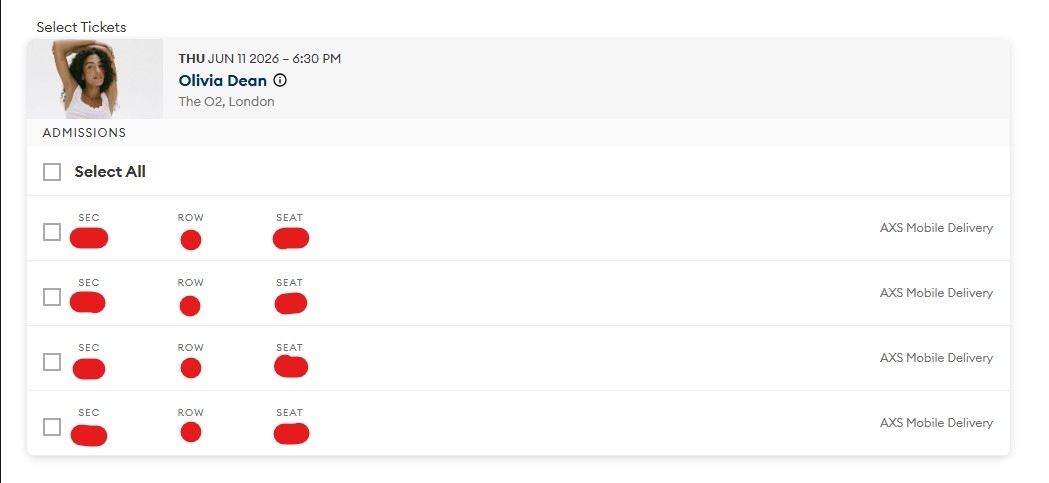
3) It will then ask what price you’d like to list at, the maximum will be the face value amount of the tickets. Note that this price can’t exceed the face value of the ticket, if you want to sell over face value, you’ll need to use platforms such as Viagogo or StubHub. For the expiration date, you’ll usually want to put “End of Resale Window” and for selling options “Sell any number of tickets”, unless you don’t want to be left with 1, in that case put “Sell even number of tickets”.
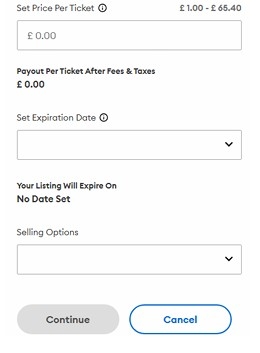
4) It’ll then ask for your details and bank account details. Answer these accurately. After that, you’ll be able to list your tickets!